Azure DevOps-native sprint and flow intelligence
Sprint health, flow metrics, forecasting, reporting, and operational controls inside Azure DevOps with no publisher-hosted analytics backend.
Most opened
Start where teams spend their time
The five views teams open most, measured across every organisation running Agile Analytics over the last 30 days.
#1
Dashboard
Every team’s sprint at a glance: velocity, WIP, cycle time, and forecast tiles on one screen.
#2
Live Stats
The current sprint in real time: scope, progress, and what’s blocked right now.
#3
Sprint Summary
The sprint story stakeholders actually read: committed, delivered, carried over, and why.
#4
Epic Analytics
Progress, scope creep, and delivery confidence for every epic in flight.
#5
Monte Carlo Forecast
“How many items by when?” answered with probability bands from your own throughput.
Real-time visibility into every sprint
Understand how your team performs sprint over sprint. Catch commitment drift early and arrive at every planning session with data to back your decisions.
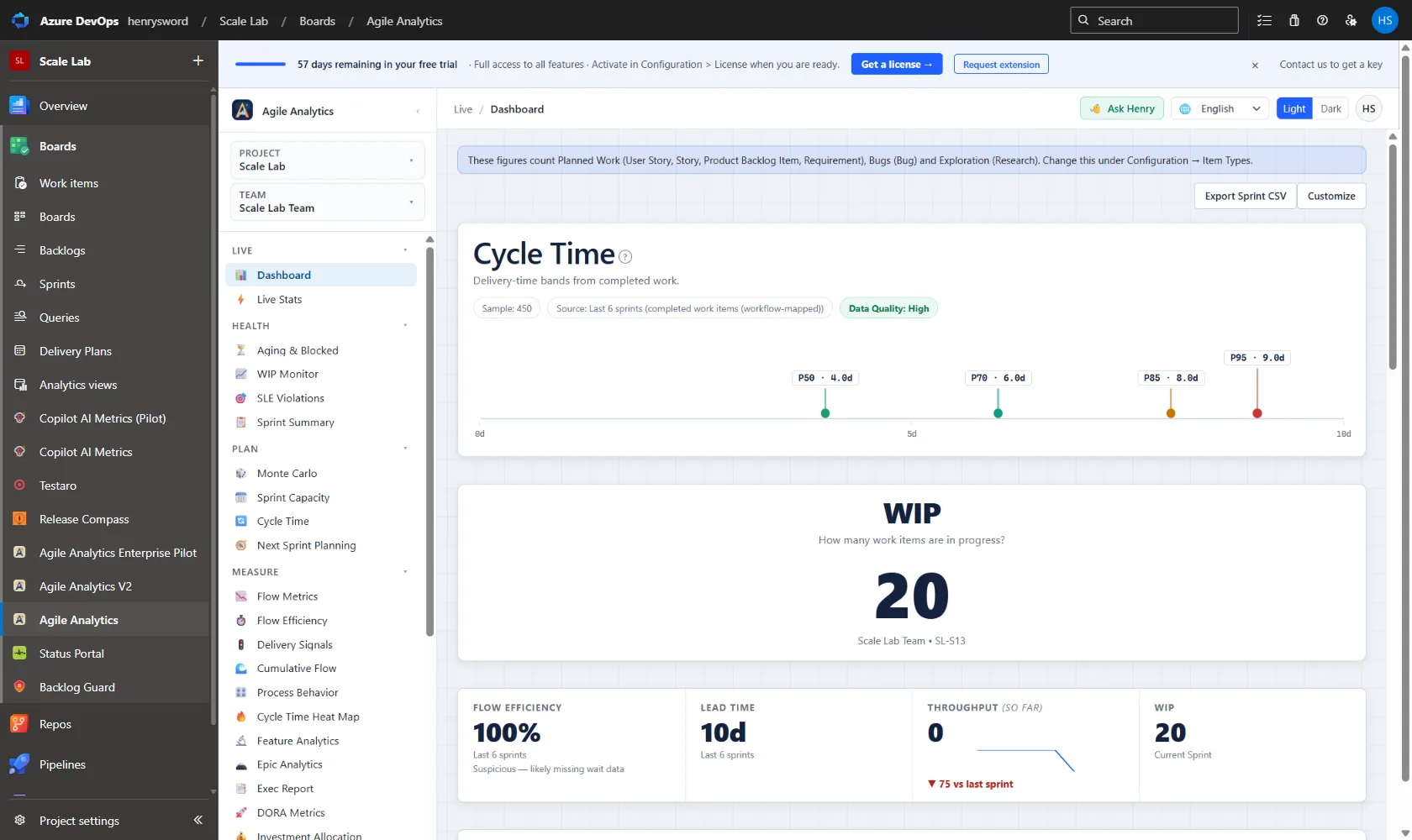
Dashboard
The view you land on. A grid of signal cards: cycle time, WIP, throughput, headline KPIs, SLE breaches, velocity, burndown, sprint detail, plus a "how many can we finish?" forecast at p50, p70, p85 and p95. Show, hide and reorder the cards so the dashboard matches how your team reads a sprint; the arrangement is saved per user and persists across sessions.
- Every card can be shown, hidden and reordered: layout saved per user
- "How many?" forecast at p50 / p70 / p85 / p95 inline, without opening Monte Carlo
- Headline KPIs, cycle time, WIP, throughput, velocity, burndown and sprint detail in one grid
- SLE breach card links straight into the SLE Violations drill-down
- Optional cards for throughput trend and cycle-time data quality, off by default
Sprint Velocity
Visualizes the last 6 completed sprints: committed story points vs completed story points side by side. Automatically calculates commitment reliability % and flags sprints where scope creep or under-commitment occurred.
- Last 6 sprints bar chart: committed vs completed
- Commitment reliability % trend line
- Highlights over- and under-commitment patterns
- Filters by team and iteration path
Sprint Burndown
Current sprint SVG burndown chart showing ideal burn-rate vs actual remaining work. Ahead/behind badge updates live as items are completed throughout the sprint.
- Ideal line vs actual remaining work
- Ahead / Behind badge with delta in story points
- Updates live without page refresh
- Works with both story points and item count
Sprint Detail
Current sprint point summary plus a breakdown of every work item by state. See exactly what is In Progress, Blocked, Done, and yet to be started, all on one screen.
- Total committed, completed, remaining, added scope
- Items grouped by workflow state
- Blocked item indicator
- Click-through to work item detail
Scope Completion
Tracks the percentage of the original sprint commitment that was completed, separating scope added mid-sprint from the initial plan. Helps distinguish planning problems from execution problems.
- Original commitment vs final completion %
- Mid-sprint scope additions clearly flagged
- Historical scope discipline trend
- Team-level and individual-level views
Sprint Summary
A single-screen snapshot of each sprint built from revision history, not current board state. Commitment is locked at end of day 2 to account for planning refinement. Multi-team comparison with CSV export included.
- Committed set locked at end of day 2: handles late additions from distributed teams
- Scope change as net additions and removals: bounces are neutral
- Carryover based on workflow state position, not estimate fields
- Removed Items Panel with title, type, and state at removal
- Multi-team comparison with independent sprint selectors and CSV export
- Data from System.IterationPath revision history via EVER WIQL, not current board state
Live Stats
Real-time sprint state across the teams you scope in Configuration: done, in progress, and not started, by story points and work item type, with a team matrix and flags for blocked or unassigned work.
- Live counts by state, story points, and work item type
- Team matrix across every scoped team
- Flags blocked and unassigned items
- Stages come from your saved workflow mapping, not generic Azure activity fields, so "In Progress" means what your board means
Next Sprint Planning
A capacity-aware backlog forecast for the sprint you are about to plan. Combines your team's velocity history with Monte Carlo simulation to suggest a realistic commitment range, so planning is grounded in data rather than gut feel.
- Suggested commitment range for the next sprint
- Built from your team's own velocity history
- Monte Carlo simulation behind the recommendation
- Pairs with Sprint Capacity for a capacity-adjusted plan
Sprint Capacity
Reads team capacity directly from Azure DevOps Boards. No external calendar needed. Shows available days per team member, team-wide days off, and effective capacity % for any sprint. Calculates a recommended story point commitment by applying capacity % to your team's historical velocity.
- Reads iteration dates, working days, and per-member days off from ADO
- Team-wide days off (company holidays, all-hands) factored in automatically
- Effective capacity % = available person-days / total person-days
- Recommended commitment = avg velocity × capacity %
- Sprint selector covers current, upcoming, and recent past sprints
- Empty state guides teams to Boards → Sprints → Capacity if not configured
Measure flow efficiency, not just output
Cycle time and throughput reveal how work actually moves through your process. Use flow analytics to identify bottlenecks, reduce variability, and build predictability.
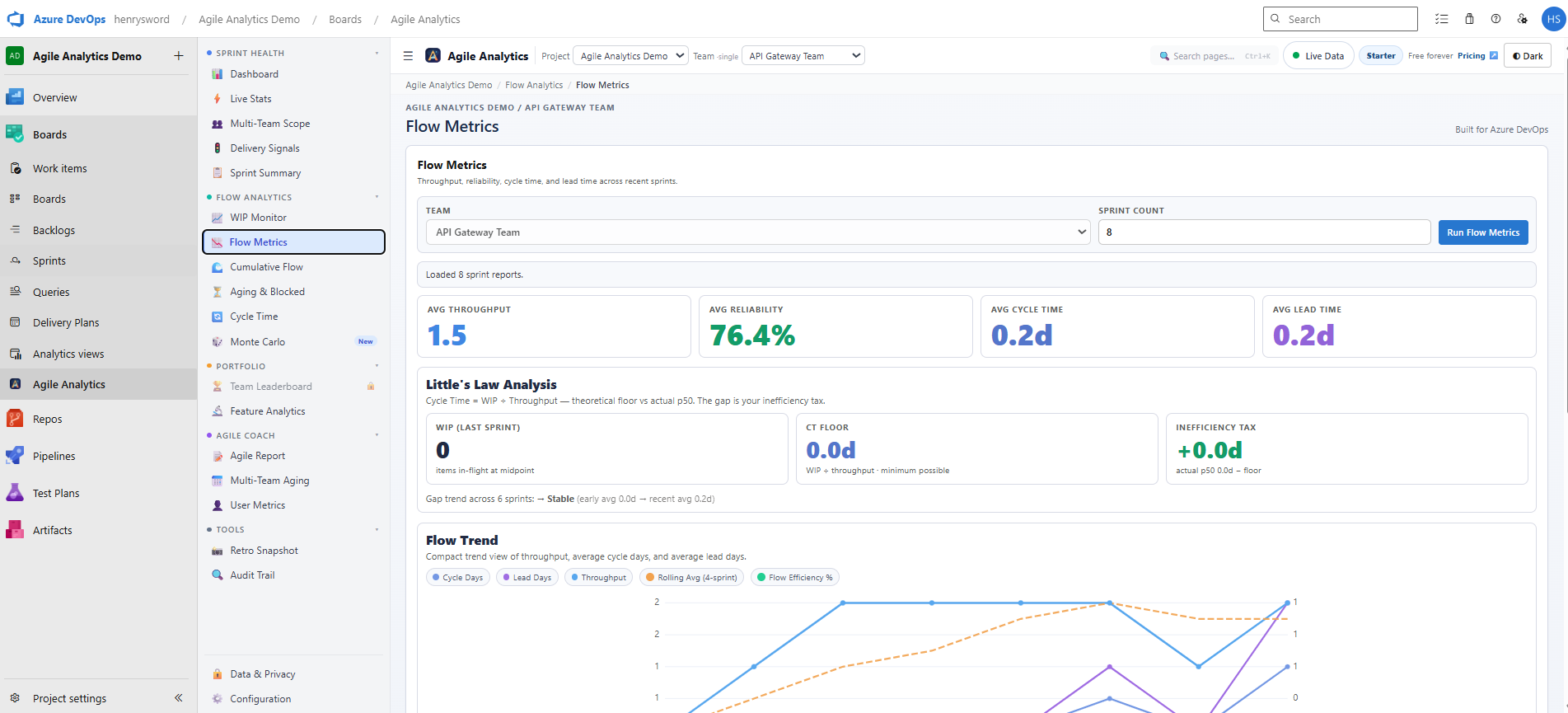
Flow Metrics
Sprint-over-sprint flow in one place: throughput, cycle time and WIP averages, a per-stage breakdown showing where the days actually go, and a Little’s Law panel comparing your theoretical cycle time (WIP ÷ throughput) against what you really delivered. When the two diverge, the gap is the queue you cannot see on the board.
- Little’s Law check: theoretical vs actual cycle time, the size of the gap, and whether it is improving, worsening or stable
- Names the stage responsible for most of the delay, rather than leaving you to guess
- Per-stage time breakdown in days and percent across New, Queued, In Progress, Test and Review
- Throughput histogram plus sprint-by-sprint trend charts
- Switch between item count and story points; sprint detail table exports to CSV
SLE Violations
The drill-down behind the dashboard’s SLE card. One section per service level expectation you have enabled: its status, the same result sentence the card shows, and a worst-first table of every completed item that missed the target window.
- One section per enabled SLE target, each with its current status
- Worst-first table of every completed item that exceeded the target window
- Opens the matching Azure DevOps query so you can act on the items directly
- Reads the exact same evaluation as the dashboard card: the two surfaces can never disagree
Cycle Time Scatterplot
Every completed work item is plotted as a dot: date completed on the X axis, cycle time in days on the Y axis. Percentile lines (50th, 70th, 85th, 95th) plus shaded percentile bands (Vacanti-style) give instant SLE (Service Level Expectation) visibility and reveal distribution density at a glance. The chart explains itself: completed-looking items it excludes are listed with the reason, and dots whose cycle start fell back to the creation date are labelled as estimated.
- P50, P70, P85, P95 percentile lines plus shaded bands behind them
- Filter by work item type and date range
- Outlier highlighting for long-running items
- Excluded-item notice and estimated-start labels, no silent data decisions
- Export to PNG for reporting
Flow Efficiency Trends
Tracks the ratio of active work time vs total elapsed time (wait time + active time) over rolling 4-week periods. Declining efficiency surfaces hidden queuing problems.
- Active time vs wait time breakdown
- Rolling 4-week efficiency trend
- Column-level flow analysis
- WIP vs throughput correlation view
WIP Monitor
Live board view showing every in-progress item, its age in days, and which items are approaching or exceeding team-configured WIP limits. Red badges alert on policy breaches instantly.
- Per-column WIP count vs configured limit
- Item age in days, color coded (green/amber/red)
- Configurable WIP limit per column
- Breach alert with count of violations
Aging & Blocked Items
Surfaces items that have been in the same state longer than expected or are explicitly tagged as blocked. The trend chart shows three Vacanti zones (healthy / watch / stale) drawn from your team’s own cycle-time history so escalation thresholds are calibrated to your reality, not industry generics. Prevent forgotten tickets from becoming sprint surprises.
- Age threshold alerts per column
- Blocked tag detection
- Time-in-state histogram
- Vacanti zones on the trend chart (healthy / watch / stale) from your team’s own p50 / p85
- Escalation-ready summary list
Cumulative Flow Diagram
A stacked area chart showing how work items move through six workflow stages over time. Built from state event history replayed day by day through your configured workflow mapping, not a snapshot of current board state.
- Six stages: New → Queued → In Progress → Test → Review → Done
- Built from work item state event history, not current board state
- Respects your saved workflow mapping for custom state names
- Reveals WIP accumulation, throughput drops, and queue build-up at a glance
Process Behavior Chart (Wheeler XmR / SPC)
Wheeler’s X-chart + moving Range statistical method applied to your sprint metrics, as documented in Donald Wheeler’s Understanding Variation and Daniel Vacanti’s When Will It Be Done?. Separates routine variation (noise) from genuine process signals using the natural process limits (UCL / LCL = X̄ ± 2.66 × average moving range). Switch the metric between throughput, cycle time (p50), and flow efficiency.
- Natural process limits (UCL / LCL) computed from your sprint history, not industry generics
- Auto-flags Wheeler signals: outside-limits, runs of 8 on one side, 3-of-4 beyond ±2σ
- Metric selector: throughput / cycle time (p50) / flow efficiency
- Preliminary-vs-stable confidence notice based on sprint count (Wheeler-recommended thresholds)
Cycle Time Density Heat Map
A 2D density grid where each cell is the count of items completed in a given (ISO week, cycle-time band) cell. Warm cells show where the bulk of your delivery sits; visible downward drift of warm cells across weeks is an early indicator of cycle-time creep, usually a leading signal of WIP overload before period-aggregate percentiles shift.
- Cycle-time buckets: 1–3 d / 4–7 d / 8–14 d / 15–30 d / 31+ d (rows)
- ISO weeks of completion (columns), configurable lookback window
- Sequential blue → amber → red colour scale by item count per cell
- Per-team filter; works against the same workflow mapping as Cycle Time and CFD
Forecast delivery with statistical confidence
Use your own historical throughput data to build probabilistic forecasts. Stop guessing delivery dates and start presenting confidence intervals backed by 10,000 simulated futures.
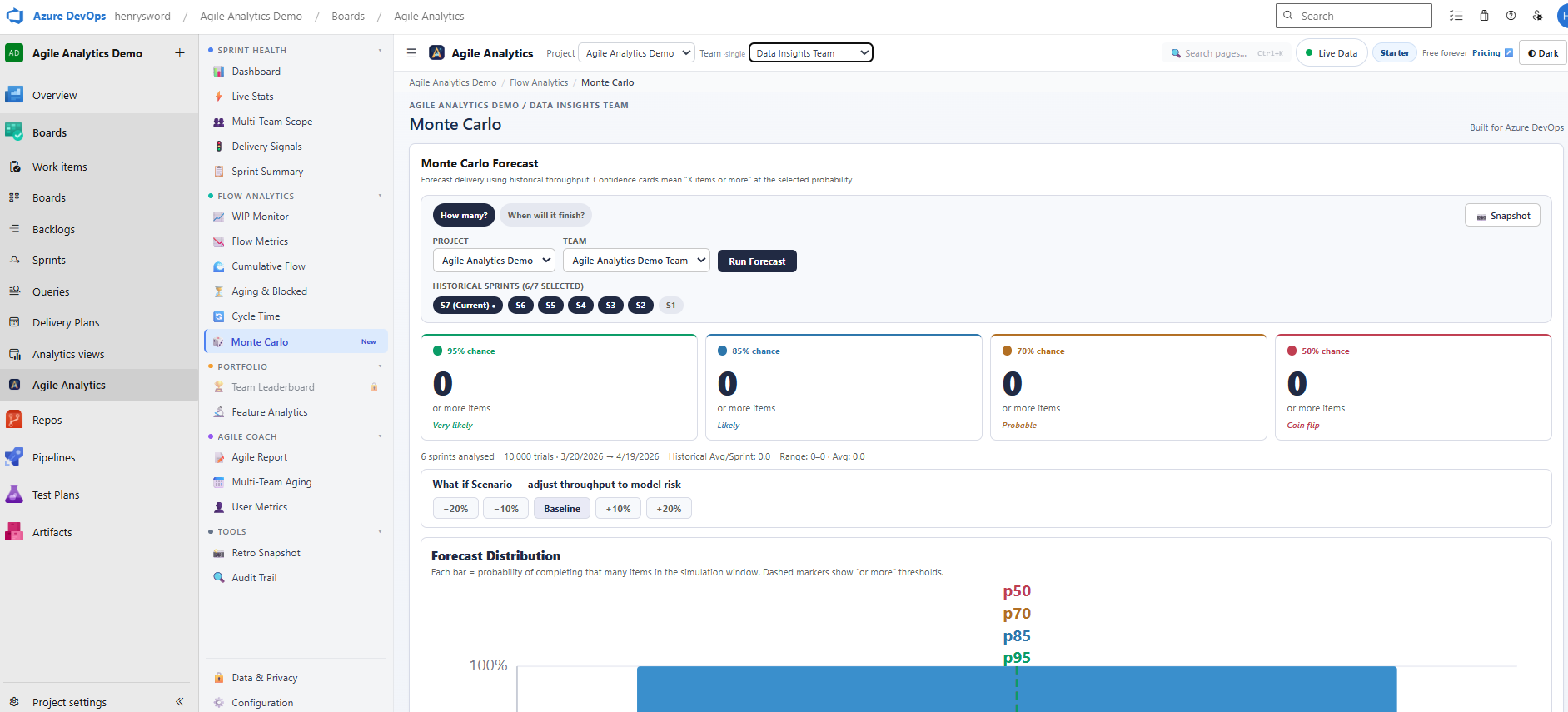
Monte Carlo Forecast
Enter a backlog item count, select a throughput window, and the simulator runs 10,000 iterations drawing from your real delivery data. Output: P50, P70, P85, and P95 delivery date estimates.
- 10,000 simulation runs per forecast
- P50 / P70 / P85 / P95 confidence date bands
- Configurable throughput lookback window
- Histogram of simulated completion dates
Feature Analytics
Tracks active Features and their child story completion percentage using WIQL link queries. Know which features are on track and which need attention before stakeholder reviews.
- Feature-level completion % via child link query
- Active vs completed child story counts
- Rollup from any work item hierarchy level
- Filter by area path and iteration
Epic Analytics
Epic-level progress with completion percentage, delivery pace, and a plan-aware quarterly roadmap. Scope it to a team and it finds the epics that team actually works on, even when the epics themselves live at the project root.
- Per-epic completion % rolled up from child work items
- Quarterly roadmap honours Target Dates: planned epics shown as planned, not projected
- Flags epics whose delivery pace lands later than the planned date
- Leads with your most-complete epics; expands on one click
Delivery Signals
Aggregated risk signals across all current work: blocked ratio, WIP policy compliance, cycle time deviation, and scope change index. Single-panel health score for leadership dashboards.
- Composite delivery health score
- Blocked ratio, WIP compliance, scope drift signals
- Traffic-light status (green/amber/red)
- Trend vs previous sprint comparison
Answer leadership questions without leaving Azure DevOps
DORA metrics, a stakeholder-ready Exec Report with scheduled email digests, and an investment allocation view that shows where engineering effort actually goes, all computed from the work items and pipelines already in your Azure DevOps org.
DORA Metrics
The four industry-standard delivery measures: deployment frequency, lead time for changes, change failure rate, and time to restore. Computed natively from your work items and pipelines. Turn on the deploy-linked option and lead time and change failure rate are measured from the deployments that actually shipped, not inferred. Nothing is sent to Baytek, no connectors, no separate DevOps intelligence platform.
- Deployment frequency and lead time for changes from your pipeline history
- Opt in to deploy-linked mode and lead time is measured from the work items in each real deployment
- Change failure rate attributed to actual deploys ("N of M sampled deploys failed"), shown beside the defect-based estimate rather than replacing it
- A deploy counts as failed only when two signals agree: a bug opened in its responsibility window, and a later deploy shipping that fix
- Anything that cannot be attributed is disclosed on the card, never quietly counted
- Computed per team, inside your Azure DevOps org. No exporting and no third-party connectors required
Exec Report
A stakeholder-ready summary of delivery health generated from your live sprint and flow data. Print it to PDF for the meeting, or schedule an email digest so leadership gets the update without opening Azure DevOps.
- One-page delivery summary built for stakeholders, not practitioners
- Print to PDF straight from the view
- Scheduled email digests with double opt-in and one-click unsubscribe
- Report content is generated on demand, never stored on our servers
Investment Allocation
Shows where each team’s effort actually goes, features vs bugs vs maintenance, so you can answer "how much of our capacity builds new value?" with data instead of instinct.
- Features vs bugs vs maintenance split per team
- Unplanned work called out separately
- Work that cannot be classified is shown explicitly, no silent buckets
- Project-wide row alongside per-team rows for org-level context
Company-wide AI adoption analytics and intervention management
Monitor AI tool usage across every team in your organisation, surface at-risk users automatically, and give admins the tools to act on adoption signals, all inside Azure DevOps.
AI Metrics Dashboard
Company-wide AI adoption analytics for GitHub Copilot or a Custom API endpoint. Included in every subscription and available during the 30-day trial. Shows realistic demo data until a live source is connected.
- Overview tab: Active Users, Acceptance Rate, Suggestions Generated, Teams Active stat cards
- Users tab: Top 10 and Bottom 10 users by acceptance rate, to spot engaged and at-risk contributors
- Teams tab: Team / Manager Leaderboard sorted by adoption metrics
- Insights tab: actionable adoption patterns and recommended next steps
- Settings tab (admin): connect GitHub Copilot or a Custom API. Test Connection validates before saving
- Export button enabled when a live data source is connected
- DEMO DATA badge visible until a live connection is established
AIIP: AI Improvement & Intervention Panel
Admin-only panel for acting on AI adoption signals. Turns data into interventions, celebrates milestones, and routes Teams webhook notifications per team.
- Alerts tab: Critical / Warning / Info severity cards for low-usage, high-rejection-rate, sudden-drop, and milestone events, with Acknowledge and Resolve actions
- Interventions tab: training, reminder, and documentation items linked to official Microsoft Learn and GitHub Docs resources. Mark Done when complete
- Celebrations tab: milestone achievement cards surfaced automatically when users hit acceptance rate records
- Settings tab: Teams webhook per team, configurable alert types and thresholds, Privacy & Compliance section
- Audit tab: full chronological log of all admin actions
Guided team coaching signals and automated delivery monitoring
Multi-team health grids, user contribution metrics, retro-ready snapshots, and a Background Monitor that keeps delivery checks running even when the browser is closed.
Background Monitor
A scheduled Azure Pipeline that checks your WIP limits and posts an alert to Microsoft Teams or Slack when a team goes over. Download the generated YAML from Configuration, add it to a repo in your project, and the check keeps running even when no one has the extension open.
- Download a ready-to-run pipeline YAML with no extra extension permissions required
- Choose the cadence: every 3, 6 or 12 hours, daily on weekday mornings, or off
- Alerts post to a Microsoft Teams or Slack webhook you supply as a secret pipeline variable
- Runs inside your own Azure DevOps organisation using the built-in pipeline access token
Retro Snapshot
One-click PNG export of your sprint summary: velocity, burndown, flow metrics, and key insights. Share directly to Teams or Slack, or drop it straight into your retro board.
- Export sprint velocity, burndown & flow summary as PNG
- Share to Microsoft Teams or Slack webhook
- Export as Markdown for wikis and docs
- Always up-to-date with live sprint data
Multi-Team Aging
See aging work-in-progress across multiple teams on one screen, no context switching. Designed for coaches and delivery managers who oversee more than one squad at once.
- Aging WIP across multiple teams in a single view
- Spot blocked or stalled items without switching team context
- Colour-coded age bands for instant prioritisation
- Useful for program-level stand-ups and coaching conversations
Control, compliance, and user metrics
Manage who sees what, understand individual contribution patterns, and configure the extension to match your team's workflow states and board setup.
Access Control
Built-in Admin and User roles with Azure DevOps directory search. Admins configure limits, alert thresholds, and AI settings. Users get a read-only analytics experience.
- Admin vs User role assignment
- ADO directory search for user selection
- Role-based view permissions
- Audit log for configuration changes
User Metrics
Individual-level contribution metrics: items completed, story points delivered, pull request authorship, and cycle time by assignee. Surface coaching opportunities.
- Per-user velocity and cycle time
- Pull request authorship, counted from the PR links on each work item, no additional Azure DevOps code permission required
- Normalized workload distribution chart
- Sprint-over-sprint comparison by individual
Team Benchmarks
Normalized comparison across multiple squads or Scrum teams in a program. Score incorporates velocity, commitment reliability, WIP discipline, and scope change index, framed around which teams need support first, not ranking people.
- Multi-team comparison in a single program view
- Composite score across 4 health dimensions
- Trend arrows (up/down vs prior sprint)
- Filter by area path to scope the comparison
Industry Benchmarks
Opt-in, anonymised comparison of your flow metrics against a peer group of similar teams. Off by default. When an admin turns it on, the extension contributes rounded cycle time, throughput and sprint completion figures plus a team-size bracket and whether you run Scrum or Kanban, and reads back how you compare.
- Off by default: an admin has to opt in explicitly
- A cohort only publishes once at least 5 similar teams have joined, so no single organisation is identifiable
- Rounded numbers only: no work item content, no names, no project data ever leaves your tenant
- While a cohort is still filling it says so honestly, rather than showing a fabricated comparison
Notification Alerts
Send alerts to Microsoft Teams or Slack via webhook. Seven triggers across three groups: Sprint Health, Flow & WIP, and Digest. They fire automatically when conditions are detected as you open the extension.
- Sprint Health: Commitment Reliability Low, Scope Churn Exceeded, Carryover Risk, Sprint End Summary
- Flow & WIP: WIP Over Limit, Stale In-Progress Items (5+ days without state change)
- Digest: Weekly Sprint Digest to your Teams or Slack channel
- Enable channels independently: one webhook per channel, pick only the triggers you need
Customer Readiness
Built-in pre-install diagnostic that validates whether a project and team have the data, workflow mappings, and sprint history needed for each analytics dashboard. Know exactly what is ready before onboarding a new team.
- Per-dashboard readiness status: Ready, Limited, or Blocked
- Checks workflow state mapping, sprint history, and team configuration
- Overall health summary with prioritized fix actions
- Run on-demand from Configuration, no external tool needed
Support Diagnostics
Sanitized error log stored inside your Azure DevOps organisation. When something goes wrong, export the diagnostics bundle as JSON (copy or download) and send it to support if you choose. The bundle is sanitized before it is written, and nothing reaches us unless you send it.
- Captures extension errors with context: view, project, team, operation
- One-click Copy or Download JSON export
- Clipboard fallback for Azure DevOps iframe restrictions
- Clear logs when no longer needed. Stays inside your ADO org
Configuration
Extension-level settings: custom workflow state mappings, WIP limit policies, AI model selection, alert threshold configuration, and Background Monitor pipeline management. All settings are reliably persisted across version upgrades.
- Custom workflow state to lifecycle phase mapping
- Per-column WIP limit policy editor
- AI provider and API key configuration
- Background Monitor pipeline YAML generation
Org Hygiene
A read-only scan of the organisation that surfaces inactive teams, stale work items, and empty iterations. Nothing is modified: each finding comes with the Azure DevOps path to fix it yourself.
- Inactive teams, stale work items, and empty iterations in one scan
- Configurable staleness threshold in days
- Read-only: the scan never changes anything in your org
- Open findings straight in Azure DevOps, or export each section to CSV
Audit Trail
A per-sprint, per-work-item timeline of every state transition: timestamps, durations, and full event detail. Built for sprint reviews and retrospectives where you need to know exactly when and how items moved through the workflow.
- Work item type colour-coded: Story blue, Bug red, Research purple, Feature amber, Task slate
- Timestamps and duration for every state change
- Expand/collapse per item for full event detail
- Useful for sprint reviews, retrospectives, and delivery audits
Data & Privacy
An in-app transparency page that documents exactly what the extension accesses and stores. Built for procurement reviewers and security-conscious organisations. Share this tab instead of preparing a separate trust document.
- Your ADO data stays in your tenant · No data warehouse on our side · Read-only ADO access
- Settings stored in ADO only · No third-party analytics · Licence checks and usage telemetry are the only things sent to Baytek, and the page says exactly what they contain
- ADO permissions: vso.work, vso.project, vso.graph and vso.build (all read-only, no write permissions)
- Full data inventory: work items, state history, sprints, teams, projects
Ready to try every feature with your whole organisation?
Start with a 30-day free trial: every user in your org gets full access while you evaluate. Pick the seat count that fits your team and activate when you are ready.