Unified GitHub Copilot adoption analytics andJira delivery insightsin one dashboard, inside Jira Cloud.
Built for Jira admins, engineering leaders, DevOps managers, and platform teams who need a clean way to understand Copilot adoption, contributor engagement, and delivery context from one enterprise-friendly experience.

Why Jira teams use it
Operational visibility without leaving Jira
- Understand whether GitHub Copilot seats are actually being used
- Compare AI-tool adoption with delivery activity and contributor patterns
- Identify coaching, recognition, and seat-reclaim opportunities faster
- Configure live metrics securely from a clean admin setup flow
Open in demo mode instantly
First-run users see a complete dashboard immediately, so the app never feels empty during evaluation or rollout.
Measure Copilot seat value
Track active users, suggestions, acceptance rate, lines accepted, and other ROI-style productivity signals from one view.
See team and contributor patterns
Spot strong performers, low-activity users, adoption gaps, and coaching opportunities before renewals or expansion decisions.
Secure by design
Built on Atlassian Forge with encrypted secret storage, read-only Jira access, and tightly limited external network calls.
Features
Analytics, context, and admin control in one Jira-native experience
Every section is designed to help engineering leadership move from raw usage numbers to team-level operational insight.
Overview Dashboard
A Jira dashboard gadget and global page that surface KPI cards for active users, total seats, suggestions generated, accepted suggestions, acceptance rate, lines accepted, chat users, agent users, and trend deltas over time.
Adoption Funnel
Visualize licensed users, ever active users, active this month, active this week, and active today to understand how usage narrows through the org.
Trend Analytics
Track daily activity, contributor engagement, acceptance rate, and usage patterns across 7, 14, 30, and 90 day windows.
Team & Contributor Insights
Review top users, low-activity users, leaderboards, contributor rankings, and team performance views from one operational dashboard.
Analysis & Smart Actions
Surface practical next steps such as coaching low-adoption teams, reclaiming underused seats, celebrating high performers, or watching for declining activity.
Jira Context Enrichment
Optionally add Jira project key scope, issue type filtering, created/updated/resolved trends, and contributor work activity alongside AI usage data.
Settings & Secure Setup
Admins can choose the data provider, keep demo mode on by default, enter the GitHub organization name, add a GitHub PAT, test the connection, and optionally configure custom telemetry settings.
Live GitHub Copilot Integration
When live data is enabled, the app can pull GitHub Copilot billing data, seat information, usage metrics, and language, IDE, model, and feature breakdowns.
Product preview
A clean, trustworthy admin experience
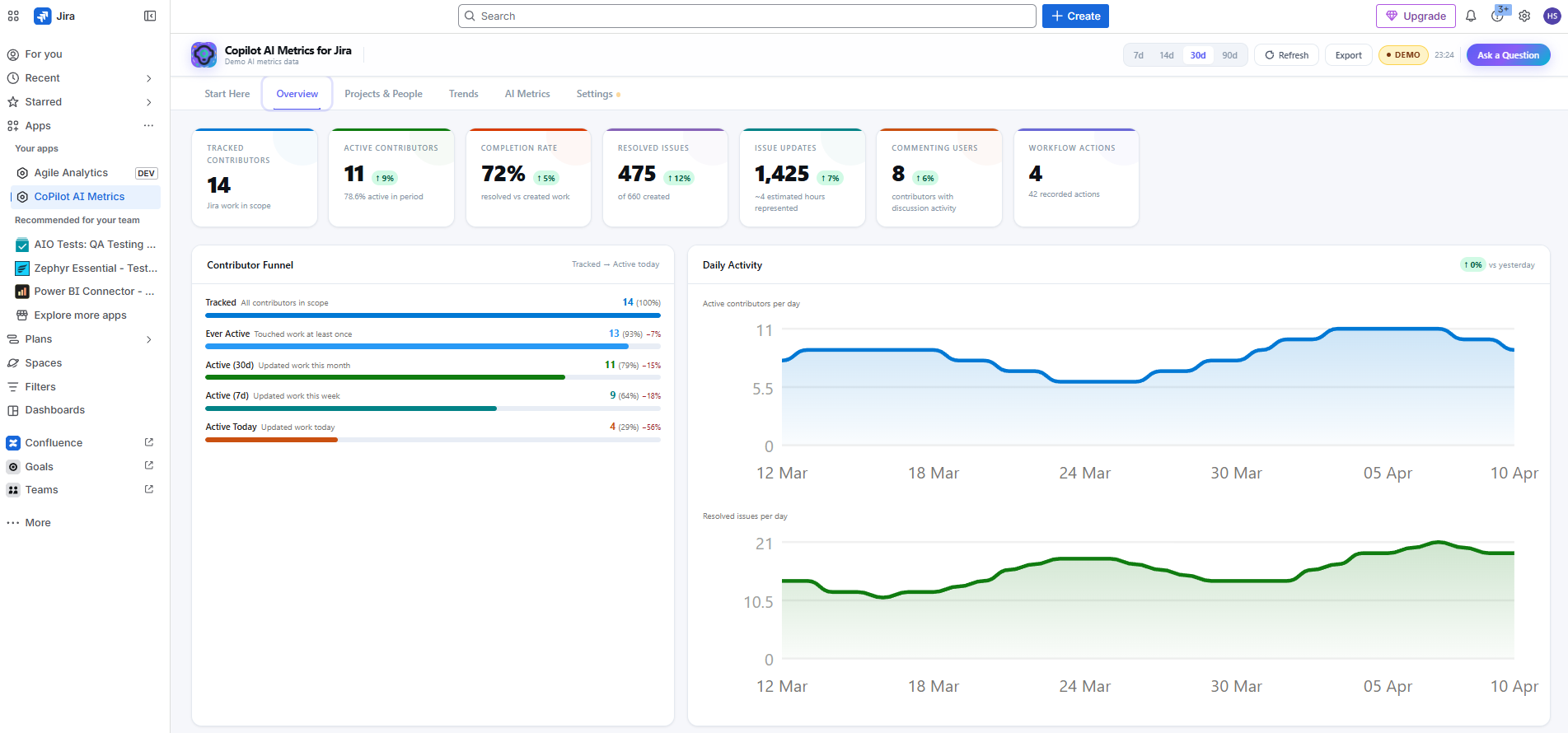
Overview dashboard — contributor funnel, daily activity trends, completion rate, and workflow action visibility in Jira Cloud.
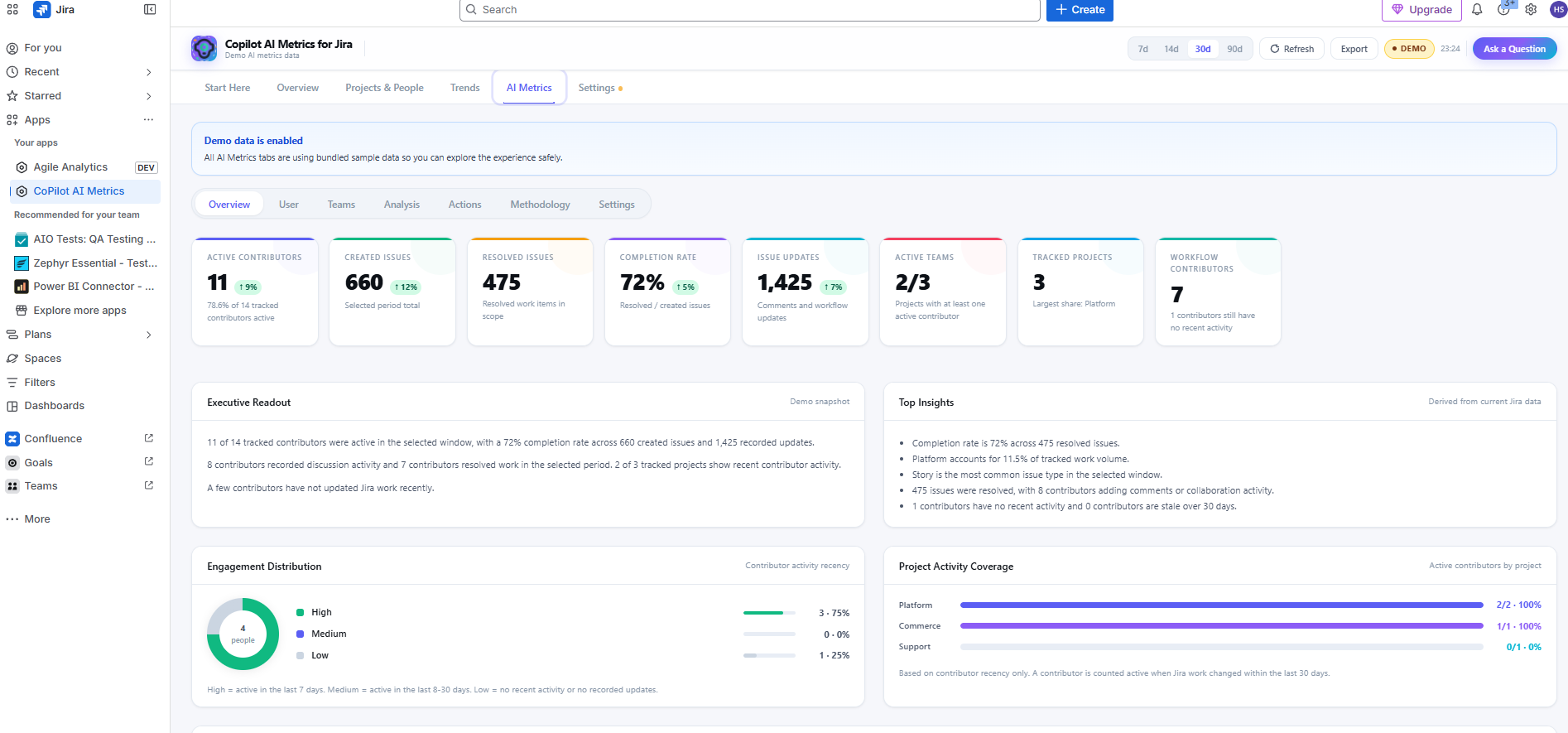
AI metrics view — contributor activity, created and resolved issue trends, executive readout, and project coverage in one screen.
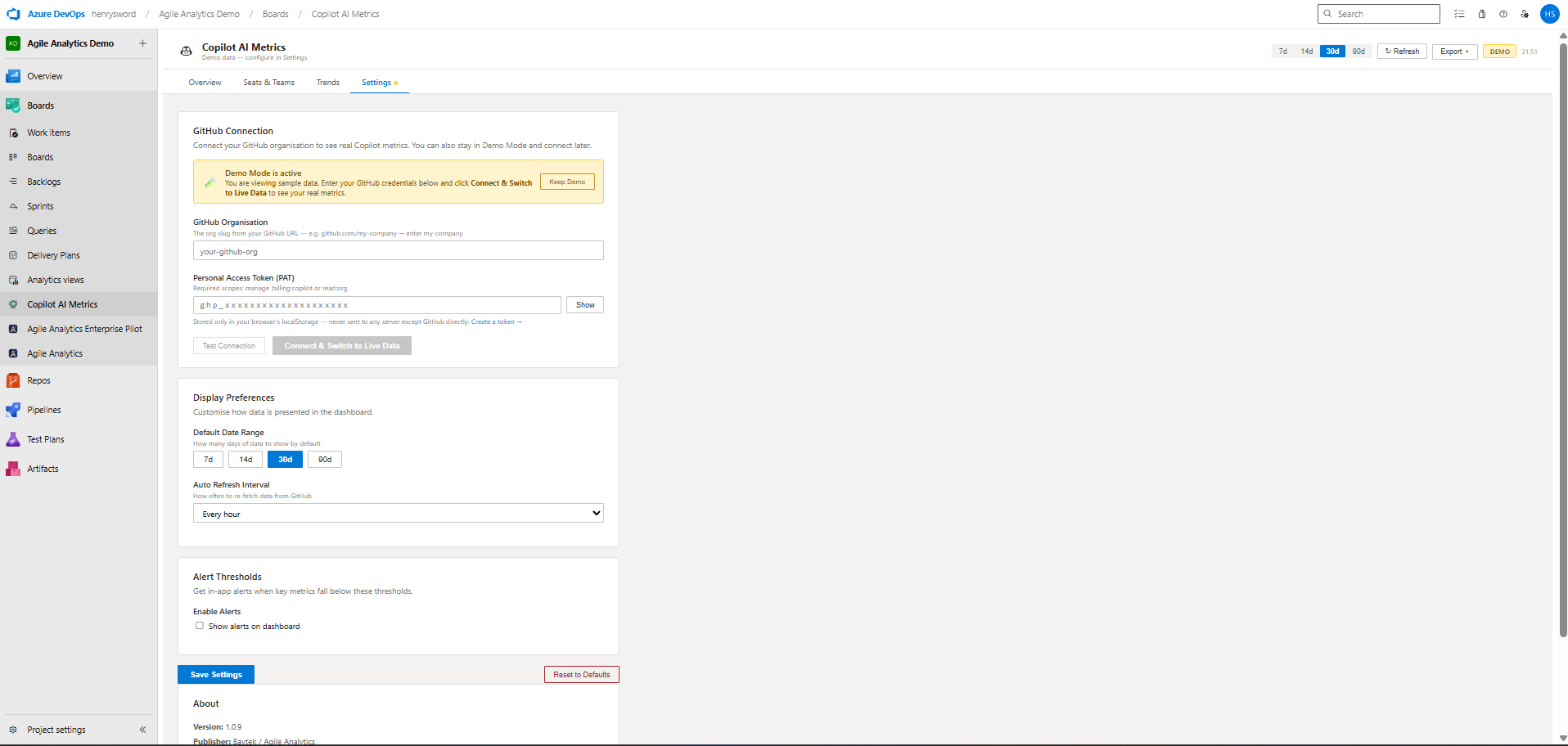
Admin setup — demo mode, GitHub organization connection, PAT entry, and optional Jira scoping controls.
How it works
Setup flow for Jira Cloud admins
The app is intentionally simple to evaluate and safe to roll out gradually.
Install the app in Jira Cloud.
Open it in demo mode right away.
Go to Settings.
Enter your GitHub organization and Personal Access Token.
Test the connection.
Turn off demo mode to load live data.
Optionally scope results by Jira project and issue type.
Security & trust
Forge-native, privacy-aware, and enterprise-friendly
The architecture is designed to give admins confidence during security review and platform rollout.
Support & contact
Resources for admins and rollout teams
Keep the evaluation process straightforward with clear help paths, policy pages, and FAQ-style answers.
Support
For rollout help, admin questions, or security review follow-up, contact:
support@baytekdev.com
Docs & help
Step-by-step setup guide, feature overview, and FAQ for Copilot AI Metrics.
View documentation →Policies
Review the dedicated Copilot Metrics for Jira privacy, terms, and security pages.
Does the app write to Jira issues or change workflow data?
No. The app is presented as read-only for Jira data access and is designed to enrich reporting, not modify issue content or workflow state.
Can admins explore the experience before connecting GitHub?
Yes. Demo mode is enabled by default on first install so teams can review the dashboard layout and workflow before loading live Copilot data.
Where is the GitHub PAT stored?
Secrets such as the GitHub Personal Access Token and optional custom API keys are stored in Atlassian Forge encrypted storage, not in the browser.
What external services does the app call?
The app is designed to keep external network access narrow and enterprise-friendly, with GitHub data requests limited to `api.github.com` and routed through the Forge backend.
Turn AI usage into operational insight inside Jira Cloud
Start in demo mode, validate the experience with your admins, then connect live GitHub Copilot data when your team is ready.