Azure DevOps sprint reporting, dashboards, and forecasting without Power BI
Agile Analytics is the Azure DevOps (ADO) extension your engineering managers will actually open. Next Sprint Planning, sprint health, flow metrics, DORA metrics, and Monte Carlo forecasting in one place. Installed in minutes, free for 30 days.
Product paths
Choose the product experience that matches your platform
Azure DevOps and Jira editions are priced and trialled separately, and Copilot Metrics and Testaro are their own products. Pick the one that matches your platform and problem.
Agile Analytics for Azure DevOps
The commercial edition: 30-day trial, one price per organisation, and every sprint and flow view.
View pricing →Agile Analytics for Jira
The Jira Cloud edition: sprint intelligence, aging charts, flow metrics, and forecasting.
Explore Jira edition →Copilot Metrics
GitHub Copilot adoption, engagement, and seat usage for teams on Azure DevOps or Jira.
Explore Copilot Metrics →Testaro
Native test management for Azure DevOps: author cases, run suites, and report on quality without leaving your ADO tenant or paying per tester.
Explore Testaro →All Features Included
Every feature on every plan
Agile Analytics is licensed per Azure DevOps organisation. Pick the number of seats that fits your team. Every plan unlocks the full product.
Next Sprint Planning
Capacity- and Monte-Carlo-aware recommendation for what your team can realistically commit to next sprint, with cycle-time reality check, backlog risk scan, and commitment reliability, all read from your existing Azure DevOps Boards data.
Flow metrics that stay inside Azure DevOps
Track cycle time, cumulative flow, WIP pressure, and throughput without exporting your delivery data into another reporting stack.
Monte Carlo forecasting
Run probability-based forecasts from your own throughput history so delivery conversations are grounded in confidence ranges, not guesses. Built-in Azure DevOps reporting stops at averages and standard deviations.
Sprint intelligence
See velocity, scope change, carryover, burndown, team health, and alerts in one place for every team in the organisation.
Sprint capacity planning
Read sprint dates, working days, days off, and per-member capacity directly from Azure DevOps Boards to calculate effective capacity and recommended commitment.
AI adoption analytics
Track GitHub Copilot adoption across every team: active users, acceptance rates, team leaderboards, and an admin panel for acting on the signal.
Operational alerts
Catch WIP breaches, stale work, sprint risk, and weekly digest events early through built-in notifications and monitoring.
Stakeholder-ready exports
Export any chart to PNG and any table to CSV, and build shareable sprint summaries for stakeholder reviews and leadership reporting, straight from the views your team already uses.
See the dashboards your teams will actually use
From sprint summaries to flow analytics and forecasting, the full experience lives inside Azure DevOps from trial through paid activation.
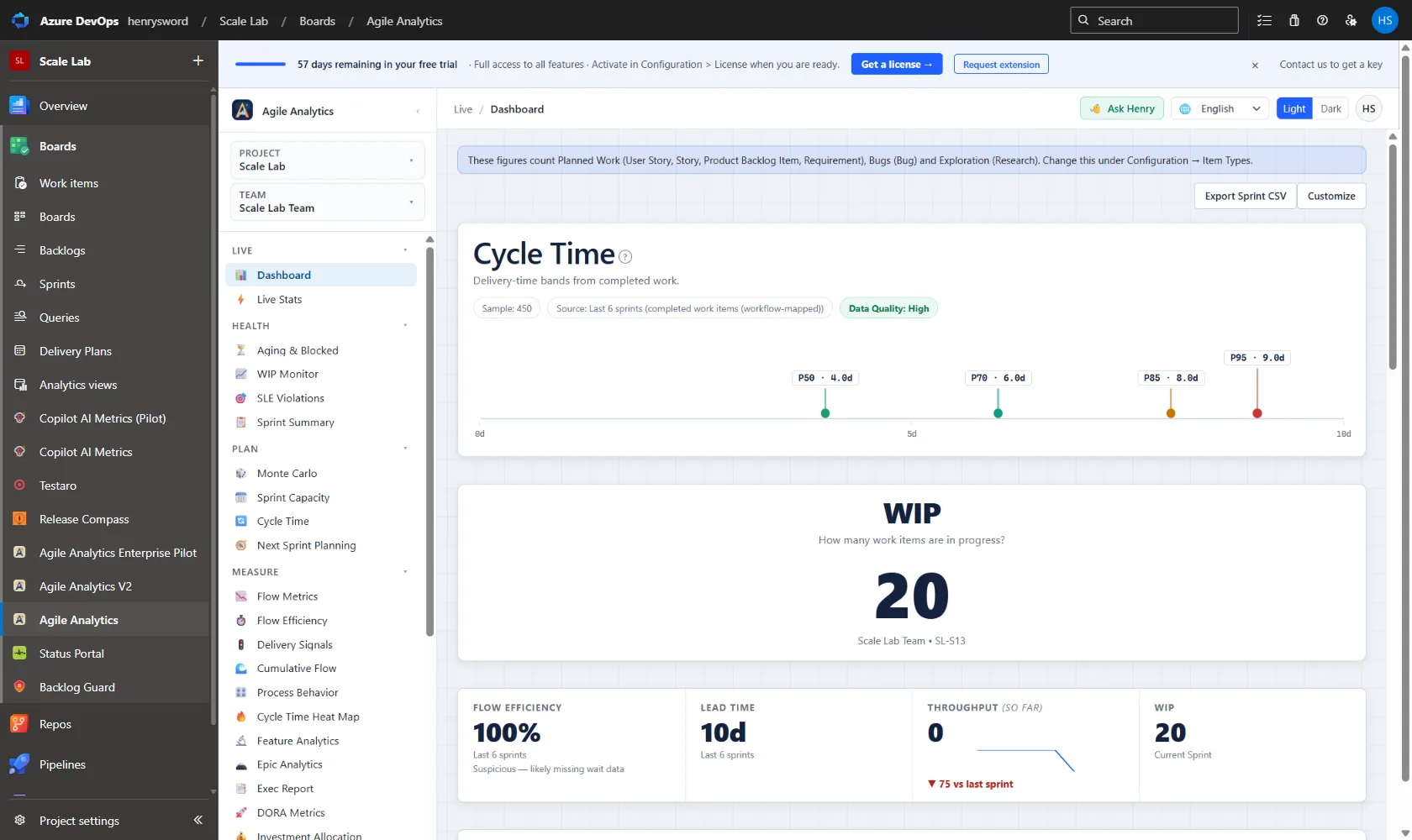
Dashboard
Sprint health at a glance: cycle time percentiles, work in progress, lead time and throughput, all read from the Boards data you already have.
Pricing
Pricing that grows with your team
Team $300/yr (2 seats) · Business $1,200/yr (6 seats) · Premium $2,000/yr (unlimited)
One flat price per organisation. You're never charged per user. See how it compares to per-user pricing →
Start with the delivery problem you want to solve first
Browse targeted pages for sprint reporting, flow analytics, forecasting, WIP control, and buyer comparisons.
- Use CaseOpen page →
Azure DevOps Analytics Extension
An Azure DevOps (ADO) analytics extension for sprint reporting, flow metrics, DORA metrics, and forecasting without a separate BI stack or hosted analytics backend.
- Use CaseOpen page →
Azure DevOps Sprint Reporting
What a sprint analytics extension for Azure DevOps needs to get right: day-one commitment, scope change, carryover, cycle time, and multi-team rollups, and how Agile Analytics does each one with Sprint Summary, Sprint Capacity, Live Stats, Delivery Signals, Exec Report, and Retro Snapshot.
- Use CaseOpen page →
Azure DevOps Cycle Time Analytics
Cycle time analytics for Azure DevOps Boards: a percentile scatterplot, a cycle-time density heat map, honesty flags for estimated starts and reopened items, and SLE compliance tracking, computed inside the hub with no PAT.
- Use CaseOpen page →
Azure DevOps Monte Carlo Forecasting
Monte Carlo forecasting for Azure DevOps (ADO) teams that need data-backed delivery dates and confidence ranges without building a separate forecasting tool.
- Use CaseOpen page →
Azure DevOps WIP Monitoring
WIP monitoring for Azure DevOps (ADO) teams that want faster visibility into overloaded teams, blocked work, and aging in-progress items before delivery risk compounds. The WIP Monitor and Aging Chart views in Agile Analytics, inside Azure DevOps.
- Use CaseOpen page →
Azure DevOps Dashboard
A unified Azure DevOps (ADO) dashboard for sprint health, flow metrics, forecasting, and delivery signals, without exporting data to Power BI or another reporting stack.
- Use CaseOpen page →
Power BI Alternatives for Azure DevOps Reporting
What are the alternatives to Power BI for Azure DevOps sprint reporting and dashboards? A sourced, honest comparison of the built-in Azure DevOps Analytics widgets, Power BI with the Analytics service, and an in-product extension, with the real answer for each buyer.
- Use CaseOpen page →
Azure DevOps Flow Metrics
A flow metrics tool for Azure DevOps (ADO) covering flow efficiency, cumulative flow, aging work items, and throughput, computed from your boards without exporting data anywhere.
- Use CaseOpen page →
Azure DevOps Analytics Without a PAT
Azure DevOps analytics that needs no personal access token and keeps work item data inside your tenant. How Agile Analytics reads Azure DevOps through the signed-in user’s own session, which four read-only scopes it declares, and exactly what does and does not reach the publisher.
- ComparisonRead comparison →
Azure DevOps Analytics vs Power BI
A sourced comparison of Azure DevOps Analytics, Power BI, and Agile Analytics: OData feeds, licensing costs, data freshness, and where each fits.
- ComparisonRead comparison →
ActionableAgile Alternative for Azure DevOps
A sourced, side-by-side comparison of Agile Analytics and ActionableAgile Analytics for Azure DevOps: flow metrics, Monte Carlo forecasting, pricing, data handling, and where each is the better choice.
- ComparisonRead comparison →
Best Azure DevOps Analytics Tools
A decision framework for picking the best Azure DevOps (ADO) analytics tools, covering DevOps analytics extensions, Power BI, ActionableAgile-style apps, and built-in ADO reporting.
Practical rollout guidance for Azure DevOps teams
Three recent posts.
Team and Business plans are moving to annual billing
Team and Business subscriptions are now billed once a year — $300/year for Team and $1,200/year for Business, the same total as before. Premium is unchanged. Existing monthly subscribers keep their current price and billing exactly as they are.
Read article →Change Failure Rate You Can Defend: Attributing Failures to Real Deployments
Most change failure rate numbers are a ratio of bugs to delivered work — a proxy that answers a different question than the one DORA asks. Here is how to compute CFR from actual deployments in Azure DevOps: which deploy broke, what counts as evidence, and why an honest number has to say when it does not know.
Read article →"Not authorized to access this resource" — why Stakeholder access can't read analytics
TF400813 is the error we see most often, and it is almost never a fault in the extension. Azure DevOps Stakeholder access cannot read work item data, so any analytics tool built on it returns empty. Here is how to confirm that is what you are hitting, and exactly what to ask your administrator for.
Read article →Common questions
What counts as a seat?
A seat is an assigned place on your plan. Your extension admin assigns people in Configuration → Access Control; assigned users, including admins, each hold one seat. The Team plan includes 2 seats, Business includes 6, and Premium is unlimited. You can swap seats at any time by removing someone and assigning someone else. During the trial there are no seats: everyone in your organisation has full access.
What happens if my team grows past my seat count?
You can never be billed for more than your plan. When every seat is assigned, new assignments are simply refused until you remove someone or upgrade. Everyone without a seat still sees the Dashboard and can request a seat from your admin in one click.
Which plan should I pick?
Pick Team if a few people on one squad will open the reports, Business if you have a full delivery team or two, and Premium if you want every Azure DevOps user in your org to be able to look at the metrics whenever they like.
What counts as an "organisation"?
One Azure DevOps organisation (for example, dev.azure.com/your-org). The extension is installed at organisation level, so the seat count is scoped to that organisation. Each subscription covers a single organisation, and your license key locks to the first organisation it is activated in. If you run more than one organisation, each needs its own subscription.
Got a question before you install?
Hi, I'm Henry Sword
I lead Agile Analytics at Baytek. Our team ships updates every few weeks, and I read every message in this form personally. Ask anything: pricing for an unusual team size, a feature you can't find, procurement or security questions, or just say hi.
30-second form • Personal reply within one business day
Ready to start the 30-day trial?
Install from the Azure Marketplace, use every feature with your whole organisation, and activate your license key only when you're ready to keep going.
30-day free trial • Plans from $300/yr • Every feature included