Use Case
Azure DevOps analytics without exporting your data to another platform
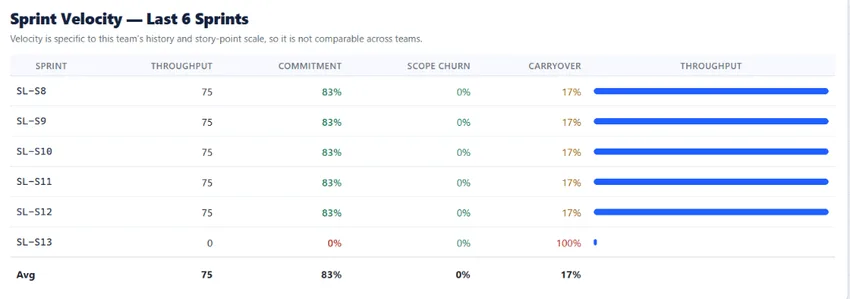
Agile Analytics is an Azure DevOps extension that adds Monte Carlo forecasting, flow metrics, DORA metrics, sprint health, Next Sprint Planning, dashboards and widgets, and an exec report to Azure DevOps Services (cloud). Agile Analytics gives Azure DevOps teams sprint health, flow metrics, and forecasting inside the tools they already use. It is built for buyers who want faster rollout, lower data-sharing risk, and a shorter path from evaluation to install.
Why teams look for an Azure DevOps analytics extension
- Built-in Azure DevOps reporting is too limited for real sprint and flow analysis
- Power BI or external analytics tools add setup time, maintenance, and data movement concerns
- Engineering managers need delivery forecasting and WIP visibility without buying a full SEI platform
What the analytics extension gives you
- Install in your Azure DevOps organization and start the 30-day free trial in minutes
- Keep analytics inside your tenant with no publisher-hosted analytics backend
- Roll out flow metrics, Monte Carlo forecasting, and monitoring org-wide on one annual plan per organisation, with every feature included
Explore core features
See the full feature catalog (sprint health, flow analytics, forecasting, and executive insights) that ships with every plan.
Open page →Compare the analytics options
How the built-in reports, Power BI with the Analytics service, and Marketplace extensions compare on rollout time, audience fit, and maintenance cost.
Open page →Review security posture
Work item content and sprint data never traverse Baytek’s backend. The one backend that exists is narrowly scoped to licensing, minimal install telemetry, and the questions people choose to ask AGAN AI, the built-in assistant.
Open page →How Agile Analytics works
A plain-language walk-through of what the extension adds to Azure DevOps and where your work item data is read.
Open page →Azure DevOps analytics extension questions
Why use an Azure DevOps analytics extension instead of Power BI?
An extension keeps rollout lighter. Teams can install and use it inside Azure DevOps without building a separate reporting pipeline, semantic model, or publisher-hosted data store.
Who usually buys this kind of extension?
Scrum Masters, engineering managers, delivery leads, agile coaches, and PMO stakeholders evaluating how to improve predictability in Azure DevOps.
Do the smaller plans have fewer features?
No. Every feature is on every plan. The plans differ only in the number of seats.
Does Agile Analytics work with Azure DevOps Server?
No. Agile Analytics supports Azure DevOps Services (cloud) only, not Azure DevOps Server.
Which Azure DevOps permissions does Agile Analytics request?
It requests four read-only scopes: vso.project, vso.work, vso.graph, and vso.build. Your work-item content stays in your own Azure DevOps tenant.
Is there a free trial, and how much does it cost?
There is a 30-day free trial with no credit card. After that, annual plans are per organisation: Team is $300/year for 2 seats; Business is $1,200/year for 6 seats; Premium is $2,000/year for unlimited seats.