An Azure DevOps dashboard is a page of tiles, and each tile is a widget. Most teams start with a query tile and a burndown, then add more until nobody reads the page. The fix is to give every widget one job: answer one question the team or a stakeholder asks every week. This guide covers the six widgets that answer those questions, what each one needs to show before you can trust it, which built-in Azure DevOps widgets already cover part of the job, and the tiles Agile Analytics adds to the widget catalog.
Start with the questions, then pick the widgets
Write the questions down before you open the widget catalog. For a delivery team they are usually these:
- Did we deliver what we committed to this sprint, and what changed after we committed?
- Is our delivery rate stable from sprint to sprint?
- How long does a typical item take from start to finish, and which items are outliers?
- Are we finishing work as fast as we start it?
- What is stuck or aging right now?
One dashboard per audience
A team dashboard and a stakeholder dashboard need different widgets. The team needs aging items and blocked work it can act on today. A stakeholder needs delivery rate and a forecast. Six to eight widgets per dashboard is a sensible ceiling; past that, the page needs scrolling and people stop scrolling.
The built-in Azure DevOps widgets worth knowing
Azure DevOps ships a widget catalog with every organisation, and several of its widgets are good starting points. Sprint Burndown and Burnup chart remaining or completed work through an iteration. Velocity shows planned work against completed, completed late and incomplete work per iteration. Cumulative Flow Diagram shows how many items sit in each board column over time. Cycle Time and Lead Time plot completed items with a moving average and a standard deviation band. Query Tile and Chart for Work Items turn any saved work item query into a number or a chart. The charting widgets read from the Azure DevOps Analytics service, and each one is configured per team. If the built-in set answers your questions, use it. The sections below say what to check in each widget, whichever tool draws it.
Widget 1: Sprint summary
A sprint summary answers "did we deliver what we committed to?". To answer it honestly, the widget needs a commitment baseline taken at a fixed moment. If the baseline moves every time someone adds an item, the sprint always looks on track. It should show items committed, items completed against that baseline, scope added after the baseline as its own number, and carryover into the next sprint. In Agile Analytics the commitment is locked at the end of day 1 of the sprint, and Sprint Summary shows the result as "Delivered 12 of 15 committed" (with your own numbers), alongside the change in commitment reliability from the previous sprint.
Widget 2: Velocity over the last six sprints
A velocity widget earns its place through comparison, so it needs several sprints of history. Six is a practical default: three sprints is too noisy to show a trend, and ten reaches back past most team changes. Show what was committed next to what was delivered in each sprint, otherwise a team that commits to less always looks steady. Scope churn and carryover belong in the same view, because they explain most drops. The Agile Analytics Sprint Velocity card covers the last six sprints with the columns Sprint, Throughput, Commitment, Scope Churn, Carryover and Relative throughput, plus an Avg row.
Widget 3: Burndown or burnup with a scope line
A burndown with a single line hides the most important event in a sprint: work being added. Use a chart that draws total scope as its own line. When scope rises, the gap between the scope line and the completed line widens, and nobody has to point it out in the review. A burnup makes this easier to read than a burndown, because added work shows as the top line moving up instead of the remaining line bending. The Agile Analytics card is titled Sprint Burnup and draws three lines, Scope, Ideal and Completed, with a toggle between Items and Story Points.
Related: Azure DevOps burndown chart guide
Widget 4: Cycle time scatterplot
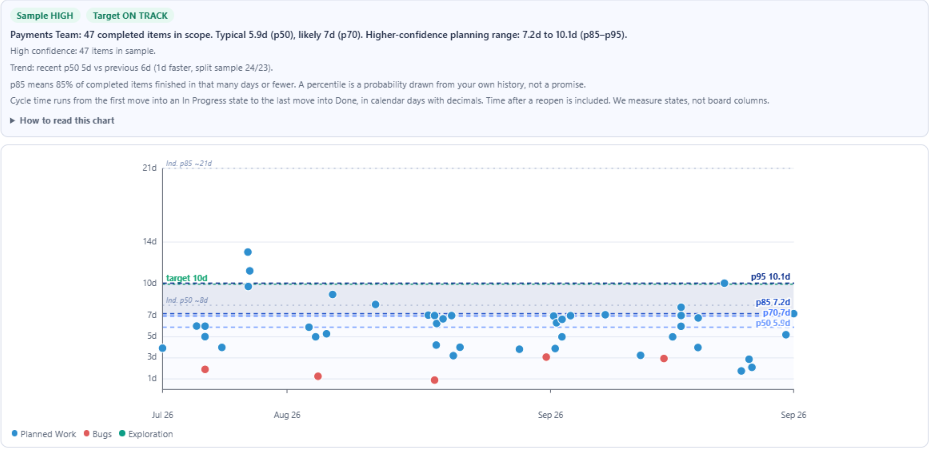
Cycle time belongs on a scatterplot, one dot per completed item, placed by completion date and by how many days it took. Percentile lines run across the chart. An average hides the spread, and the spread is what a team needs to see: one item that took 30 days pulls the average up while most work still finishes in under a week. Read a percentile line as a promise you can make. If the 85th percentile is 7.2 days, 85% of recent items finished in 7.2 days or less. The Agile Analytics Cycle Time view draws p50, p70, p85 and p95 lines and a target line (10 days unless you change it), over a window of 1, 3, 6 or 12 sprints.
Widget 5: Throughput
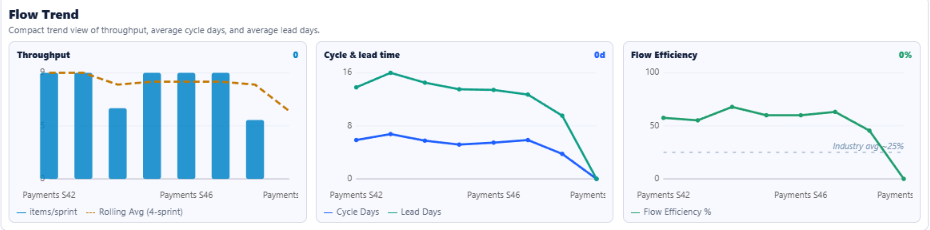
Throughput is the count of items completed per sprint or per week. It is the simplest measure of delivery rate and the input to every probabilistic forecast, because a Monte Carlo simulation samples from it. Show at least six periods and a rolling average so a single slow sprint does not read as a trend. Pair it with velocity: velocity tells you how much sized work was delivered, throughput tells you how many items. If throughput holds while velocity falls, the items got smaller, which is usually good news. The Flow Metrics view in Agile Analytics draws throughput bars per sprint with a Rolling Avg (4-sprint) line, next to cycle and lead time and flow efficiency.
Widget 6: Flow signals
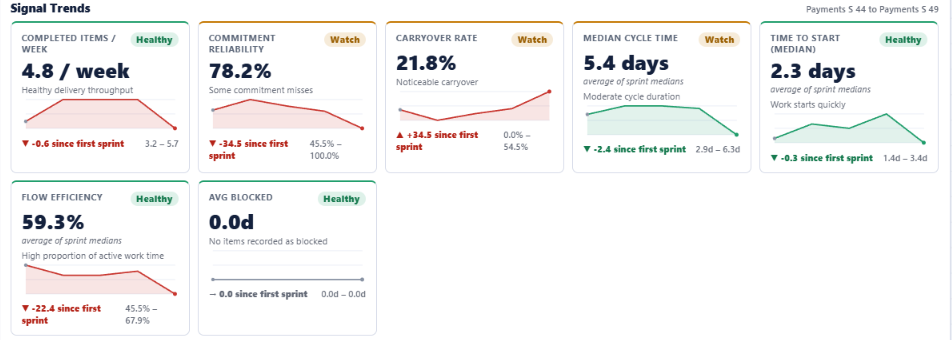
The last widget covers the slow problems: work that has aged past its normal cycle time, blocked items, carryover creeping up, and work-in-progress above the team limit. None of these shows up in a burndown until the sprint is already lost. A good flow-signal widget gives each signal a trend and a plain health label, so the team sees which one to act on first. The Agile Analytics Delivery Signals view has a Signal Trends section with cards for Completed Items / Week, Commitment Reliability, Carryover Rate, Median Cycle Time, Time to Start (Median), Flow Efficiency and Avg Blocked. Each card is marked Healthy, Watch or Low against thresholds your organisation can edit; by default a median cycle time of 5 days or less is Healthy.
Agile Analytics tiles for your Azure DevOps dashboard
Agile Analytics adds six tiles to the Azure DevOps widget catalog, under the category "Agile Analytics". They read the same data as the hub and follow your saved workflow mapping, so a tile and the matching hub view show the same number. To add one: open the dashboard, select Edit, search the catalog for "Agile Analytics", add the tile, then open its Configure panel and pick a team from the Team list (each entry reads Project / Team). Until a team is picked, the tile says "Select a team". Sprint Forecast is free for every organisation; the other five need a trial or a subscription.
- Team Health: a score from 0 to 100 with a grade from A to F. The score weights commitment reliability at 30%, scope churn and carryover at 20% each, and throughput trend and WIP utilisation at 15% each, over the last six sprints. Green is 70 and above, amber 50 to 69, red below 50. A one-line verdict says which factor needs attention.
- Cycle Time: p50 and p85 cycle time for the latest sprint with finished items, and a sparkline of both over the last six sprints.
- Throughput: items completed per sprint over the last six sprints as bars, with Latest and Avg figures. The latest bar is highlighted.
- Sprint Forecast: a Monte Carlo forecast of how many items the team completes next sprint at 85% and 50% confidence, from up to 12 finished sprints.
- DORA Snapshot: deploys per week, lead time p50, change failure (proxy) and restore p50 over a 30-day window.
- AI Adoption: GitHub Copilot acceptance rate and active users, using the connection set up in the hub.
Where the full views live
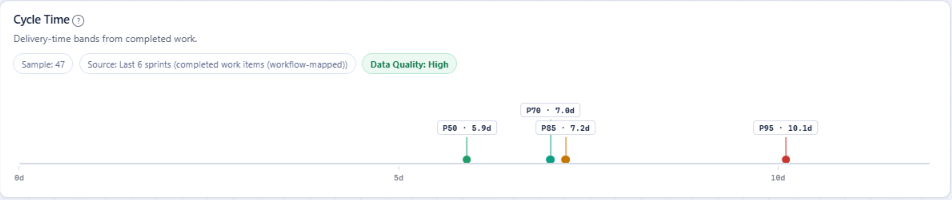
The tiles are summaries. The full views open in the Agile Analytics hub under Boards, where each chart has its own filters and the How These Metrics Work page explains every calculation. The hub has its own Dashboard too, made of cards like the cycle time card below. By default it opens with Headline KPIs (Flow Efficiency, Lead Time, Throughput and WIP), then Cycle Time beside a “How many?” Forecast, then Throughput beside WIP. Select Customize to show, hide or reorder cards: drag a card by its handle or use the arrows, and the layout is saved to your account. Optional cards such as Sprint Velocity, Sprint Burndown and SLE Breaches start hidden. "Restore classic layout" brings back the earlier arrangement and "Reset to default" the current one. Your Azure DevOps dashboards and their existing tiles are not changed by installing the extension.
Related: Azure DevOps dashboard extension · How to build a sprint and flow dashboard in Azure DevOps
A checklist before you add a widget
Run each candidate widget through these questions. If it fails two of them, leave it off the dashboard.
- Which question does it answer, and who asks it?
- Does it show a baseline or a history, so a number can be compared with something?
- Does it show spread (percentiles) rather than an average where spread matters?
- Is it scoped to one team, so two teams are not blended into one number?
- Would someone change what they do this week because of it?
A dashboard built this way stays short: six to eight widgets for one audience, each with one job. That is the dashboard people open without being reminded, and the one that saves you a status update every Friday.