A single Azure DevOps dashboard for sprint, flow, and delivery metrics
Buyers searching for an Azure DevOps dashboard usually want one place to see sprint health, throughput, cycle time, and forecast confidence, without leaving ADO. Agile Analytics adds a delivery-focused dashboard inside Azure DevOps so leads, managers, and stakeholders share the same view.
Why teams look for an Azure DevOps dashboard
- Azure DevOps Boards has charts, but no unified dashboard that ties sprint, flow, and forecasting together
- Power BI dashboards take weeks to design, model, and maintain before delivering value
- Stakeholders ask for status updates that engineering teams have to assemble manually each week
What the Azure DevOps dashboard shows you
- Open one Azure DevOps dashboard that shows sprint health, cycle time, throughput, WIP pressure, and forecast ranges
- Skip the Power BI build: every chart is wired to your boards out of the box
- Give leadership a stable, weekly-relevant dashboard instead of ad-hoc spreadsheets
What sits on the Azure DevOps dashboard
The Agile Analytics Azure DevOps dashboard is one connected view that ties together the four questions a delivery lead asks every week: is this sprint on track, how is flow trending, when are we likely to finish, and what is silently going wrong.
- Sprint health: commitment vs completed story points, burndown with the original commitment line, and a sprint summary that exposes scope additions instead of hiding them.
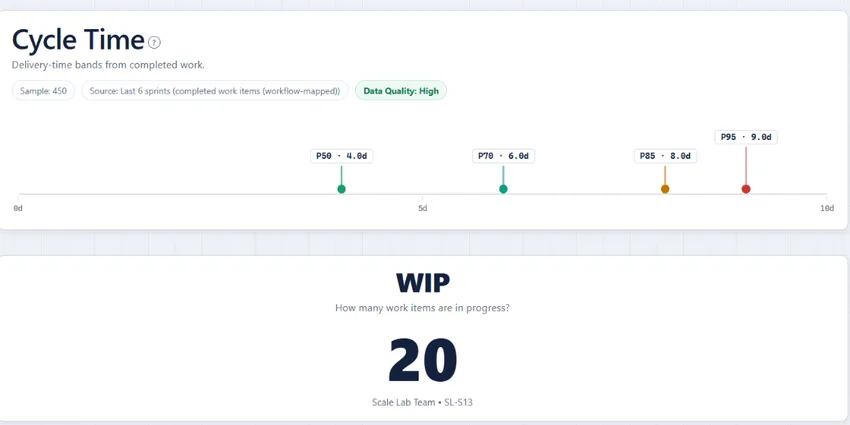
- Flow analytics: a cycle-time scatterplot with P50/P85 percentile lines, throughput by item type, and a Flow Efficiency view that splits active work time from queue time.
- Forecasting: a Monte Carlo simulation against your last six sprints of throughput, so you can give a confidence range for the next milestone rather than a single optimistic date.
- Operational early warnings: WIP monitoring, aging work, and blocked-item detection, which are the signals that usually surface in a retrospective a week too late.
Why a single Azure DevOps dashboard usually beats a Power BI rebuild
Most teams who arrive at this page have already considered building the same dashboard in Power BI. The trade-off comes down to time-to-first-chart and ongoing maintenance. A Power BI rebuild needs a dataset connector, a semantic model that mirrors your work-item types and states, DAX measures for cycle time and throughput, refresh schedules, and a workspace permission strategy, usually six to ten weeks before the first stakeholder sees a chart. The Azure DevOps dashboard in Agile Analytics ships those views pre-wired and rendered inside Azure DevOps, so the first chart is live in minutes after install. There is no separate workspace to log into, no exported dataset, and no publisher-hosted analytics backend; every chart reads your Boards data live through the standard Azure DevOps extension surface. When your process changes (new state, new team, new work-item type), the dashboard follows automatically because it joins on the same Azure DevOps schema your team already maintains.
Rolling the Azure DevOps dashboard out across multiple teams
Once one team has the dashboard pinned, the second and third teams are almost free to onboard. Every team inside the same Azure DevOps organisation inherits the same install, so there is no per-team setup, no per-team licence assignment, and no per-team data pipeline to wire up. Each team can scope the dashboard to its own area path, iteration, or filter set without affecting other teams, so the Scrum team and the Kanban team next door each see only their own work even though both use the same underlying extension. For organisations rolling the dashboard out beyond engineering (to a PMO, a delivery committee, or executive stakeholders), viewers do not need a paid Azure DevOps Basic licence; an Azure DevOps Stakeholder licence is enough to see the dashboard. Combined with one price per organisation, sized by how many people actually open the analytics hub, this makes the cost curve flat as adoption widens.
A refreshed dashboard you can make your own
The home dashboard now opens with the metrics teams check first, and you can show, hide, and reorder cards to match how your team works.
Open page →Browse all dashboards
Sprint, flow, forecasting, and configuration views: see every dashboard the extension ships with.
Open page →What every dashboard metric should show
A practical guide to the six metrics worth putting in front of a team every day, and how to read each one without drawing the wrong conclusion.
Open page →How to measure DORA metrics in Azure DevOps
Deployment frequency, lead time, change failure rate, and time to restore, read from the same Azure DevOps organisation and rendered next to this dashboard, with nothing sent to a third party.
Open page →Azure DevOps dashboard questions
How is this different from the built-in Azure DevOps dashboard?
The built-in dashboard surfaces work item queries and a few charts but does not provide flow analytics, percentile-based cycle time, Monte Carlo forecasting, or sprint commitment views. Agile Analytics adds those as a connected dashboard experience.
Can the dashboard be embedded in our existing Azure DevOps dashboard page?
Agile Analytics runs as its own hub inside Azure DevOps, one click from Boards, so your existing dashboards and tiles stay exactly as they are. The analytics views live in the hub rather than being embedded into the dashboard page.
Does it require a separate database or hosting?
No. There is no publisher-hosted analytics backend for the standard analytics workflow. Dashboards run inside Azure DevOps using your existing data.