Use Case
The sprint analytics extension for Azure DevOps buyers compare against
Buyers searching for a sprint analytics extension for Azure DevOps are usually past trusting a burndown chart on its own. They want to know what "good" sprint reporting measures, whether it survives scope change and carryover, and whether it works across more than one team. This page answers that: what a sprint analytics extension for Azure DevOps should do, and how Agile Analytics does each part, view by view, inside Azure DevOps Boards.
Why sprint reviews run on anecdotes
- Sprint reviews run on anecdotes because a burndown chart cannot tell a stable sprint from one that quietly grew
- Commitment reliability gets measured against whatever is on the board at sprint end, so scope creep never shows up as a number
- Carryover gets talked about but not counted, so unfinished items resurface sprint after sprint with no pattern to point to
- Velocity exists on its own, with no cycle time or multi-team rollup sitting next to it
What the Azure DevOps sprint report shows you
- Commitment reliability measured against what the sprint held at day one, not the shifting end-of-sprint list
- Scope change, carryover, and cycle time shown next to velocity instead of inferred from a burndown line
- Sprint health rolled up across every team in one view, not one team board at a time
- A one-page-per-team sprint report or a shareable retro snapshot, without wiring up Power BI
Sprint commitment reliability in Azure DevOps: measured from day one, not sprint end
Most sprint reports grade commitment against the wrong baseline: whatever set of items is on the board when the sprint closes. That number always looks better than it should, because a team that added easy work mid-sprint and finished it gets credit for "commitment" it never made at planning. Agile Analytics grades commitment reliability against the items the sprint held at the end of its first day, so every team is measured at the same depth regardless of when their sprint starts (a Thursday-starting and a Monday-starting team both get a one-day baseline, not a four-day head start). Work delivered by sprint end, with a 24-hour grace window, counts toward reliability; a committed item cancelled in place drops out of both sides instead of deflating the denominator; slipped work counts as carryover, not a wash. Sprint Summary (Health group) shows this baseline per team: reliability to one decimal, never a fake rounded 100%, next to counts of planned work, bugs, and exploration items in the org's own type names. When Azure DevOps cannot return every item for a short sprint, the view says so.
Scope change and carryover: visible, not buried in a chart slope
A burndown chart shows scope change as a slope, if you know how to read one, which most stakeholders in a sprint review do not. Agile Analytics surfaces it as a number: items and points added after the day-one baseline, items removed, and the resulting churn percentage, shown on the Sprint Summary card and rolled into the Delivery Signals trend (Measure group) across a configurable window of past sprints. Carryover, work planned for this sprint that slipped into the next, is counted the same way everywhere it appears: Sprint Summary, the Delivery Signals carryover trend card with its own sparkline, and the Exec Report all read the same figure, computed from one shared formula rather than three approximations that could disagree. Delivery Signals grades reliability, carryover, and time-to-start against thresholds tunable from Configuration (reliability defaults to bands at 85% and 70%), and a card only renders when there is a real sample behind it: a team with no time-to-start data gets no fabricated card.
Sprint Capacity and Live Stats: planning and real-time state, on the same commitment discipline
Sprint reporting that only looks backward misses half of what a lead needs before and during the sprint. Sprint Capacity (Plan group) turns team availability, days off, and working-day settings into person-days for the iteration, alongside a rolling average throughput and how the last sprint finished, so planning starts from a number instead of a guess. It needs a minimum sample of past sprints before showing a throughput average, and says so rather than extrapolating from one data point. Live Stats (Live group) is the real-time counterpart: a work-state distribution bar for started, in-progress, and not-started items, a pace-aware goal card reading "Day 4 of 10, expected approximately 20%" instead of a bare percentage, and a verdict computed from where the sprint is against where it should be today. It scopes to whichever teams you add, so a lead watching six teams gets one matrix instead of six open tabs, and renders demo data with no team selected rather than an error. Every card exports to CSV, and the matrix saves as a PNG snapshot.
The dashboard burndown, cycle time, and what Azure DevOps' own widgets already do
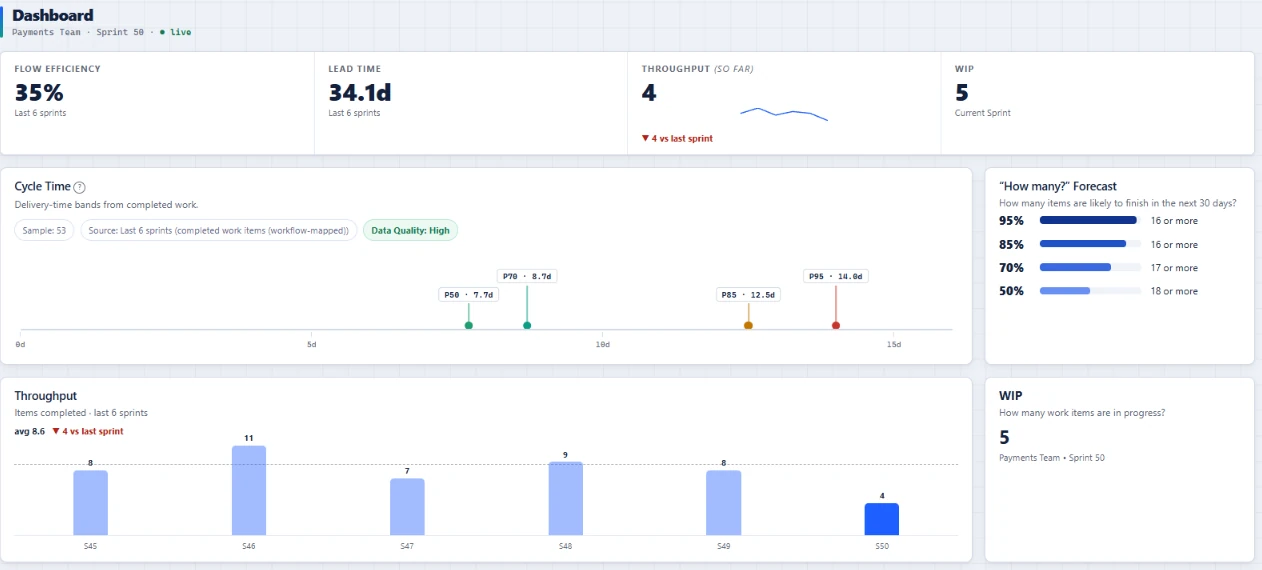
Azure DevOps ships a Sprint Burndown widget and a Velocity chart out of the box, genuinely useful for what they do: a burndown line for remaining work, and a bar chart of points completed per iteration. Where they stop is scope and honesty about the baseline. The built-in burndown does not distinguish what was committed on day one from what was added later, and the built-in velocity chart cannot tell you whether a good-looking sprint hid a pile of carryover. The Current Sprint card on the dashboard fills that gap: a burnup-style chart plotting the day-one committed baseline separately from current total scope (the amber scope line), completed work, and an ideal pace line paced against the full scope, so scope added mid-sprint is visible as it happens. Cycle time sits next to it: a percentile view (P50/P85) instead of a single average one slow item can distort, so a lead can see whether a velocity number came from steady flow or a late scramble.
Exec Report and Retro Snapshot: sharing sprint outcomes without rebuilding the numbers
Every sprint reporting workflow eventually needs to leave the dashboard, for a stakeholder update or a retrospective. Exec Report (Measure group) builds one page per team, sized for A4, with committed, delivered, reliability, scope churn, carryover, throughput, and cycle time percentiles plus a trend average across recent sprints, printable straight to PDF from the browser. It discloses its own confidence basis: when a team's committed figure had to fall back to current membership because no day-one baseline could be reconstructed (an org with imported history, for instance), the report says so rather than presenting a fallback number as a measured one. Retro Snapshot (Agile Coach group) is the lighter counterpart for the retrospective: a shareable card and PNG image comparing this sprint against the last one on the same metrics, with a plain-language read of what changed, generated from the same formulas as the rest of the product so the retro and the dashboard can never disagree.
Multi-team sprint reporting without a data warehouse
A single-team sprint report is a different problem from reporting across ten teams in one Azure DevOps organization, and most buyers researching sprint analytics extensions eventually need the second one. Sprint Summary, Live Stats, and Delivery Signals all accept more than one team scoped side by side, so a delivery lead is not opening one browser tab per team to assemble a weekly summary by hand. Every team in the organization inherits the same install, with no per-team license assignment and no per-team pipeline to wire up; each team scopes its own area path, iteration, and workflow mapping independently, so a Scrum team and a Kanban team see only their own sprint data. There is no publisher-hosted backend replicating work items into a separate database: every view reads live from Azure DevOps Boards, which is also why sprint data never leaves your tenant and the extension needs no personal access token. Agile Analytics does collect basic usage and error telemetry, described on the Privacy page, and an extension admin can turn it off for the whole organization at Configuration → Privacy.
See the full Azure DevOps dashboard
Where Sprint Summary, Live Stats, and the Current Sprint burndown tile sit alongside flow metrics and forecasting in one connected view.
Open page →See Monte Carlo sprint forecasting
Sprint reporting turned forward: a confidence range for the next milestone built from recent sprint throughput, not a single optimistic date.
Open page →Read the workflow mapping guide
How Agile Analytics maps your team's actual states and item types to commitment, carryover, and scope change, so a custom "Code Review" column still counts correctly.
Open page →Read the 6.45 release notes
The release that moved commitment reliability onto the day-one baseline across every view, with a 24-hour grace window and honest handling of cancelled items.
Open page →Azure DevOps analytics extension
The product behind this page: 30+ views inside Azure DevOps, read in your browser with no Power BI and no personal access token.
Open page →Sprint reporting questions
What is the difference between this and the built-in Azure DevOps sprint burndown widget?
The built-in Sprint Burndown and Velocity widgets show remaining work and points per iteration, which is useful, but neither separates what was committed on day one from scope added later. Agile Analytics adds that baseline everywhere: the dashboard burndown tile, Sprint Summary, Delivery Signals, and Exec Report all measure against the same day-one figure instead of the end-of-sprint list.
How is sprint commitment reliability actually calculated?
Against the items the sprint held at the end of its first day, not day two and not rolled over a weekend, so every team is measured at the same depth. Work delivered by sprint end with a 24-hour grace window counts toward reliability; a cancelled committed item drops out of both sides rather than deflating the score, and slipped work counts as carryover instead of vanishing.
Can I export or print sprint reports for a stakeholder update?
Yes. Exec Report builds one A4-sized page per team with commitment, scope change, carryover, and cycle time, printable straight to PDF from the browser. Sprint Summary and Live Stats export to CSV, and Live Stats also saves a PNG snapshot of the whole team matrix.
Does sprint carryover get counted or just discussed in the retro?
Counted, using one shared formula everywhere it appears: the Sprint Summary card, the Delivery Signals carryover trend, and the Exec Report all read the same figure, so the retro conversation and the dashboard can never disagree about how much work slipped.
Does my sprint and work-item data leave our Azure DevOps tenant?
No. Every sprint view reads live from your Azure DevOps organization; there is no publisher-hosted backend copying work items into a separate database, and the extension needs no personal access token. Agile Analytics does collect basic usage and error telemetry, described on the Privacy page, and an extension admin can turn it off for the whole organization at Configuration → Privacy.