Azure DevOps ships four system processes: Basic, Agile, Scrum and CMMI. They differ in work item types, workflow states and the field you estimate with, and those differences decide where your cycle time starts and what your velocity sums. If you're choosing between Agile and Scrum, both run sprints: Agile uses User Stories, Story Points and full task-hour tracking, while Scrum uses Product Backlog Items, Effort and Remaining Work only. You can change an existing project's process later, but it takes cleanup.
What are the four Azure DevOps process templates?
The four default processes are Basic, Agile, Scrum and CMMI. Basic tracks Epics, Issues and Tasks. Agile tracks User Stories and Bugs. Scrum tracks Product Backlog Items, Bugs and Impediments. CMMI adds Requirements, Change Requests, Risks and Reviews. Microsoft calls them processes in the Inheritance model and process templates in the XML models.
In Azure DevOps Services you customize processes in the web portal. Process templates are XML files used only with the Hosted XML and On-premises XML models (Microsoft Learn: Default processes and process templates). You can export a process template only on those XML models; Microsoft doesn't support uploading or downloading inherited processes (manage process templates). Microsoft's summary, with estimate and task fields added from the numeric fields reference:
| Basic | Agile | Scrum | CMMI | |
|---|---|---|---|---|
| Backlog item | Issue | User Story | Product Backlog Item | Requirement |
| Workflow states | To Do, Doing, Done | New, Active, Resolved, Closed, Removed | New, Approved, Committed, Done, Removed | Proposed, Active, Resolved, Closed |
| Portfolio backlogs | Epic | Epic, Feature | Epic, Feature | Epic, Feature |
| Bug tracking | Issue | Bug | Bug | Bug |
| Issue and risk tracking | Issue | Issue | Impediment | Change Request, Issue, Risk, Review |
| Backlog estimate field | Check your Issue form | Story Points | Effort | Size |
| Task tracking fields | Remaining Work | Original Estimate, Remaining Work, Completed Work | Remaining Work only | Original Estimate, Remaining Work, Completed Work |
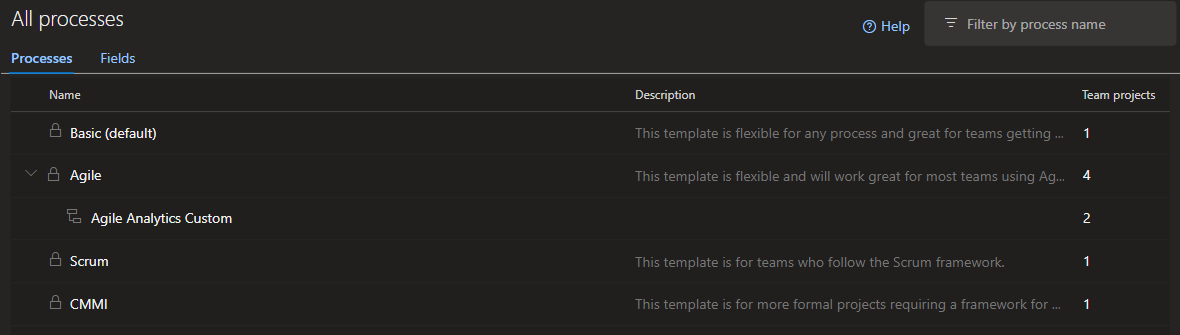
To see which process your project uses, open Project settings > Process.
When is the Basic process enough?
Basic is enough when a small team wants a plain board: Epics, Issues and Tasks with three states, To Do, Doing and Done. Microsoft recommends it for teams new to Azure Boards. It stops being enough when you need separate bug tracking, a Feature level or more workflow states.
Basic is a regular system process, available in Azure DevOps Services and Azure DevOps Server 2020 and later (Microsoft Learn). An Issue can stand for a user story, a bug or feature work (Plan and track work), so you can't split cycle time or throughput by type without tags or a custom field.
Microsoft's field reference doesn't name an estimate field for Basic Issues, so check your Issue form before planning velocity by points. Velocity by count works on any process.
What is the difference between Agile and Scrum in Azure DevOps?
In Azure DevOps, Agile and Scrum are process templates, and you can run Scrum ceremonies on either. They differ in the backlog item (User Story vs. Product Backlog Item), the estimate field (Story Points vs. Effort), the backlog states (Active and Resolved vs. Approved and Committed) and task tracking: Scrum tasks track Remaining Work only.
Microsoft says to choose Agile "when your team uses Agile planning methods, including Scrum" (choose process). Both share the Task, Bug, Feature and Epic types, and blockers are Issues in Agile and Impediments in Scrum.
Scrum's Product Backlog Item and Bug have no state named In Progress. They go from Approved to Committed to Done, and Microsoft maps Committed to the In Progress category (state categories), so the in-progress clock starts at commitment. Scrum Tasks do have an In Progress state (Taskboard), but tasks don't drive backlog cycle time.
What is CMMI in Azure DevOps and who needs it?
CMMI in Azure DevOps is a process built for formal change control and an auditable record of decisions. It uses Requirements instead of user stories, sizes them with the Size field, and adds Change Request, Risk and Review work item types. Microsoft recommends it for regulated environments. Most product teams don't need it.
Microsoft bases its CMMI guidance on CMMI version 1.3 and notes that it "isn't being updated to later CMMI versions" (CMMI process). In practice:
- Change Requests give auditors a trail of changes to requirements or design.
- There is no Removed state by default. To drop a CMMI item, you set it to Closed with a reason such as Deferred or Rejected (choose process).
- Resolved isn't finished for Requirements. Microsoft maps Requirement Resolved to the In Progress category, so the item is still in progress until Closed (state categories).
How does each process change cycle time and velocity?
Azure DevOps computes cycle time and velocity from state categories, not state names. Cycle time starts when an item first enters an In Progress category state and ends at the Completed state. Velocity credits items in the Completed category. Each process puts different states in those categories, so the same work produces different numbers.
Sources: cycle time, velocity and category mapping. For the backlog item type:
| Process | Cycle time starts at | Cycle time ends at | Velocity sums |
|---|---|---|---|
| Basic | Doing | Done | Count, or an estimate field if your Issue form has one |
| Agile | Active | Closed | Story Points or count |
| Scrum | Committed | Done | Effort or count |
| CMMI | Active (Resolved still counts as In Progress) | Closed | Size or count |
In practice:
- Scrum teams who commit at sprint planning get cycle time that includes the wait before work starts. Commit items when work starts, or add a custom In Progress state.
- Agile teams get velocity credit when stories reach Closed. If your Resolved state is in the Resolved category, the velocity chart can be set to count it as Completed.
- CMMI teams close canceled work in the same Closed state as delivered work, so filter throughput by Reason or rejected requirements count as delivered.
For the full story on categories, read our guide to Azure DevOps state categories. For how to read the numbers once they are right, see our guide to cycle time and WIP in Azure DevOps.
Can you change the process of an existing project?
Yes. Microsoft documents it: "You can switch between processes for existing projects." On the Inheritance process model, the default for Azure DevOps Services, open Organization settings > Boards > Process, select the current process, open the Projects tab and choose Change process from the project's menu. Afterward you fix board columns, work item types and states by hand.
Many answers online, including AI assistants, say it's fixed at creation. Even Microsoft's process overview page carries a note saying you can't change a project's base process. Microsoft's how-to articles describe the Change process wizard step by step:
For CMMI to or from Agile, Microsoft only says you can follow "the general guidance in the listed articles" (inheritance process model).
Before you start
Check these before you run the wizard:
- The collection must use the Inheritance process model (manage process).
- You need Project Collection Administrator (or the collection-level process permissions) to change the process, and Team or Project Administrator to fix boards.
- You can't change the process while the project has undeleted work items of a custom type that the target process doesn't define.
- Custom fields missing from the target process stay as read-only data that queries and the REST API can read.
- The Agile-to-Scrum and Scrum-to-Agile articles target an inherited process ("Scrum - Inherited", "Agile - Inherited"). System processes are locked, so the target has to be an inherited copy you can add the old types (for example User Story and Issue) to. If you skip that, the wizard stops and asks you to.
- Anything that names the old work item type or states, such as shared queries, query-based dashboard charts, Analytics views, Power BI reports and card style rules, needs checking after the change.
The steps
Run the Change process wizard:
- Open Organization settings > Boards > Process (Collection settings on Azure DevOps Server).
- Select the process the project uses now.
- Open the Projects tab, choose More actions next to the project, then Change process.
- Choose the target process and select Save. The wizard lists the manual follow-up steps.
The cleanup Microsoft tells you to do
Existing work items keep their old types and states. Microsoft lists three manual jobs:
- Fix each team's board. Select Correct this now on the error, rename the columns and map each to a valid state.
- Change work item types. Query all work items, sort by type and state, bulk-select and use Change type. Basic to Agile turns Issues into User Stories; until you do, old Issues won't show on the Agile product backlog, which lists User Stories. Agile to Scrum turns User Stories into Product Backlog Items and Issues into Impediments.
- Fix the states on every work item, not only the ones whose type you changed. Microsoft says to update State and Reason "for all items", so Tasks, Features and Epics need it too. For Basic to Agile, To Do becomes New, Doing becomes Active and Done becomes Closed. For Agile to Scrum, backlog items move to Approved, Committed or Done, and Tasks move to Scrum's To Do, In Progress or Done.

Estimates stay in the old field. When going from Agile to Scrum, Microsoft suggests Excel to copy Story Points into Effort (Agile to Scrum).
Microsoft doesn't document how the bulk state edits show up in historical charts. Each edit is a new revision dated the day you make it. If Analytics reads edits into Closed or Done as completions, that sprint's velocity and throughput jump. Do the state fixes in one batch, away from a sprint boundary, and check your charts before you show them to anyone.
How do you customize an inherited process without breaking reports?
Create an inherited process from a system process, then add fields, states and work item types in the web portal. System processes are locked. Every project using an inherited process gets its changes immediately, so test on a copy first. Pick each new state's category carefully, because the category decides cycle time and velocity.
You can add custom states and hide inherited ones, but you can't rename inherited states or change their category (inheritance process model). To test safely, copy the process, try it on a test project, then move real projects with Change process (manage process). To keep cycle time and velocity accurate:
- Put waiting states in Proposed. A custom "Ready" state in the In Progress category starts the clock before anyone works on the item. Keep it below New, because the first Proposed state becomes the default for new work items (customize workflow).
- Put review and test states such as "In Review" in In Progress so the clock keeps running.
- Use one finish line. Only one state can be Completed, and adding a custom one hides the other. Decide whether "done" means merged, deployed or accepted.
- After changing states, update every team's board columns.
Which process should you choose?
Choose Basic for the simplest board without separate bugs. Choose Agile if you track task hours as Original Estimate and Completed Work or want a Resolved step between dev done and closed. Choose Scrum if you want an Approved step before sprint commitment and only Remaining Work on tasks. Choose CMMI only for formal change requests and audits.
| Your situation | Process | Why |
|---|---|---|
| Small team, new to Azure Boards, no separate bug tracking | Basic | Three types, three states, nothing to configure |
| You track Original Estimate and Completed Work on tasks, or want a Resolved step | Agile | Story Points, Bug type, full task-hour fields |
| You want a product owner Approved step before sprint commitment and only Remaining Work on tasks | Scrum | Microsoft says Approved and Committed "map directly to Scrum ceremonies" |
| Regulated work, formal change control, audits | CMMI | Change Request, Risk and Review types |
A wrong pick is fixable but costs manual type and state edits, an Excel pass for estimates, and possibly a chart jump on migration day.
What Agile Analytics adds, and what it doesn't
Agile Analytics is an Azure DevOps extension that reads your project's actual states and state categories and maps them to flow stages, so cycle time starts where your team's work starts, whichever process you use. It doesn't change your process, states or work items, and it won't do the post-switch cleanup for you.
What the extension's Workflow Mapping does:
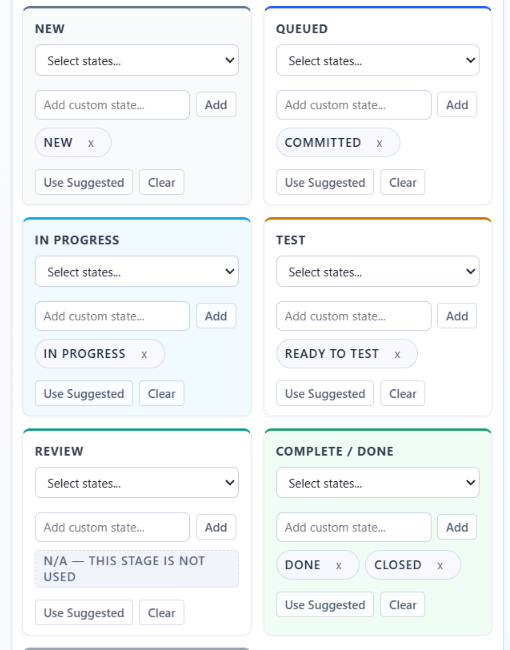
- On first open it auto-detects a mapping from the project's states and categories and never overwrites one you've edited.
- It has suggested maps for all four processes; for Scrum you can map Committed as In Progress.
- The cycle time view starts the clock when an item first enters any state you mapped to an active stage (In Progress, Test or Review), stops it when the item first reaches Done, and shows P50, P70, P85 and P95 lines.
What it doesn't do:
- It can't change processes or edit work items. It uses four read-only scopes and runs in your browser, and work item content never reaches Baytek.
- Its docs don't cover process switches; they say to reopen Workflow Mapping after adding or renaming states.
- It's for Azure DevOps Services. Baytek doesn't hold its own SOC 2 or ISO 27001 attestation today.
Pricing starts at $300 a year per organization for 2 seats.
Whichever process you pick, Agile Analytics maps its states so cycle time starts when work starts. Start the 30-day trial from the Visual Studio Marketplace. No credit card, and your whole organization has access during the trial.
FAQ
Should I use the Agile or Scrum process in Azure DevOps?
Use Agile if you estimate in Story Points, track Original Estimate and Completed Work on tasks, or want a Resolved step. Use Scrum if you want a product owner Approved step before commitment and track only Remaining Work. Both support sprints.
Can I change my Azure DevOps project from Agile to Scrum?
Yes. Create an inherited Scrum process with the User Story and Issue types added, run Change process, then change types, update states on all items and fix board columns (Microsoft Learn).
Does changing the process delete my work items or data?
No. Existing work items stay in the project, but you change their types and states by hand. Custom fields the target process doesn't have become read-only and disappear from the form, but queries and the REST API can still read them (Microsoft Learn: manage process).
Can I export an Azure DevOps process template?
Only on the XML process models. Microsoft says "uploading and downloading inherited processes isn't supported" (Microsoft Learn). Inherited processes are customized and copied in the web portal.
Is the Basic process still in preview?
No. Basic is one of the four system processes in Azure DevOps Services and is available in Azure DevOps Server 2020 and later (Microsoft Learn). It uses Epic, Issue and Task, with To Do, Doing and Done states.
Why don't Scrum backlog items have an In Progress state?
The default flow for a Product Backlog Item or Bug is New, Approved, Committed, Done. Microsoft maps Committed to the In Progress category, so built-in cycle time starts at commitment. If you want a separate In Progress step, add a custom state to an inherited Scrum process.