In Azure DevOps, an epic is a large initiative, a feature is a shippable piece of functionality inside it, and a user story is one unit of user value a team finishes in a sprint. Tasks sit under stories and track the work to build them. Parent-child links connect the levels, and rollup columns on the Features and Epics backlogs can show progress from stories up to the epic.
The names change with your process. Scrum calls the story a Product Backlog Item, CMMI calls it a Requirement, and Basic has no Feature level at all.
What is the difference between an epic, a feature and a user story in Azure DevOps?
The difference is size and time span. Microsoft's Define features and epics page says backlog items such as user stories should usually finish within a sprint, features "might take one or more sprints," and epics "might span several sprints or even releases." An epic breaks into features, a feature into stories, a story into tasks.
| Level | What it is | Typical time span | Who usually works at this level |
|---|---|---|---|
| Epic | A large body of work that breaks into several features; a major initiative or goal | Several sprints or releases | Management or portfolio teams |
| Feature | A significant piece of functionality that delivers value; a shippable capability made of related stories | One or more sprints | Product owners, management teams |
| User Story (PBI, Requirement, Issue) | A single unit of customer-facing value | Within one sprint | The delivery team |
| Task | A step needed to finish a story, tracked with Remaining Work | Part of a sprint | Individual team members |
The definitions come from the page above and the backlogs overview; the split between management and delivery teams comes from Microsoft's teams overview.
What is an example of an epic, feature, user story and task in Azure DevOps?
The epic names the outcome, each feature names something you could ship and demo on its own, and each story is small enough to finish in one sprint. Tasks are the team's to-do list for a story. Here is one branch of a billing epic in an Agile project, from the epic down to tasks.
- Epic: Customers can manage billing without contacting support
- Feature: Update payment method
- User Story: As an account owner, I can replace my card so my renewal doesn't fail (tasks: add card form to the billing page; validate the card with the payment provider; write tests for expired cards)
- User Story: As an account owner, I get an email when my card is about to expire
- Feature: Download invoices
- Feature: Change plan in the app
Three questions test a hierarchy like this. Could each feature ship without its siblings? If not, the features are cut the wrong way. Can each story finish inside one sprint? If not, split it before sprint planning. Is the epic still open after its last feature closed? Close it, or it stays on every portfolio review.
What are the backlog levels in each Azure DevOps process?
Agile, Scrum and CMMI all have two portfolio levels, Epics and Features, above the product backlog. Basic has only Epics. The product backlog level is named Stories in Agile, Backlog items in Scrum, Requirements in CMMI and Issues in Basic. Every process uses Task on the sprint backlog.
| Basic | Agile | Scrum | CMMI | |
|---|---|---|---|---|
| Portfolio levels | Epic | Epic, Feature | Epic, Feature | Epic, Feature |
| Product backlog level name | Issues | Stories | Backlog items | Requirements |
| Product backlog work item type | Issue | User Story | Product Backlog Item | Requirement |
| Sprint backlog (iteration) type | Task | Task | Task | Task |
| Estimate field on backlog items | Not listed by Microsoft | Story Points | Effort | Size |
The level names come from create your backlog and choose process, the estimate fields from Microsoft's numeric field reference. If you're still choosing a process, our comparison of the Basic, Agile, Scrum and CMMI process templates covers the rest.
Where do tasks and bugs fit in the hierarchy?
Tasks sit under user stories, PBIs or requirements and appear on the sprint backlog and taskboard. Bugs depend on a team setting. Under the board's gear icon, Working with bugs decides whether bugs behave like requirements, like tasks, or stay off backlogs and boards. That choice also decides which parent a bug should have.
From show bugs on backlogs and boards and the nesting guidance:
- Bugs tracked as requirements appear on the product backlog and Delivery Plans. Put them only under a Feature.
- Bugs tracked as tasks appear on sprint backlogs and taskboards but aren't visible on Delivery Plans. Put them only under a story, PBI or Requirement.
- Basic has no Bug type and no bug setting, so Issues cover both backlog work and defects.
What parent-child rules does Azure DevOps enforce?
Azure DevOps enforces two rules: a work item can have only one parent, and parent-child links can't form a loop. The rest is a "natural hierarchy" it expects but doesn't block: epic to feature, feature to story, story to task. You can link a story under a story, and then the backlog stops working properly.
From the link type reference and the nesting troubleshooting page:
- "A work item can have only one Parent. A parent work item can have many children." The link uses a tree topology that blocks circular references.
- Same-category nesting produces errors like "You can't reorder work items and some work items might not be shown" or "Work item 3 can't be reordered because its parent is on the same category." Remove the link or change it to Related.
- A common trigger is a bug linked as a child of a story while the team tracks bugs as requirements, which puts both in the same category. Microsoft uses this as its second example.
- In a same-category chain, boards, sprint backlogs and taskboards show only the lowest item. Microsoft's FAQ says there's no workaround to show the ones in between.
- Keep parent and child in the same project. Cross-project children drop out of the backlog when the projects use different processes, and out of rollups in Delivery Plans.
How do you map user stories to features and features to epics?
Use the Mapping pane on the backlog. Open the Stories (or Backlog items) backlog, turn on Parents and Mapping in View options, and drag stories onto a feature in the pane. To map features to epics, switch to the Features backlog and the Epics mapping pane opens. Each drag creates a parent-child link. The steps, from organize your backlog:
- Go to Boards > Backlogs and select your team.
- Pick the product backlog level: Stories (Agile), Backlog items (Scrum), Requirements (CMMI) or Issues (Basic).
- Open View options, set Parents to On, then turn on Mapping.
- Find the Unparented items at the end of the list and drag each one onto a feature in the Mapping pane.
- For features, select the Features backlog. The Epics mapping pane appears; drag features onto epics.
- To move many items at once, multi-select them and choose Change parent....
Stakeholder users in a private project can't drag to map or reparent. You can also add children from the Feature board (stories) and the Epic board (features), per define features and epics.
Why can't I see Epics or Features on my backlog?
The most common cause is the team's backlog level setting. Each team chooses which levels it sees, and that choice applies to every member. A team administrator or Project Administrator turns levels on under Configure team settings > Backlogs. If the level is on and items are still missing, check area paths, iteration paths, states and filters. To turn a level on (select backlog navigation levels):
- Open Boards and your team's board.
- Select the gear icon, Configure team settings.
- On the Backlogs tab, check the levels the team should manage, for example Epics and Features.
- Select Save and refresh the backlog.
Other causes, from the backlogs overview and the backlog review checklist:
| Symptom | Likely cause | Fix |
|---|---|---|
| No Epics or Features in the backlog selector | The level isn't selected for this team | Team admin checks it under Configure team settings > Backlogs |
| No Features level exists anywhere | The project uses Basic, which has only Epics, and custom levels can only go above Epics | Change the project to Agile (see below) |
| A specific epic is missing | Its area path isn't one of the team's area paths | Change the epic's area path, or view it from the team that owns it |
| Area path is right, item still missing | Its Iteration Path isn't under the team's default iteration path | Move it to the team's backlog iteration or a sprint below it |
| A level is checked but empty or has another name | An admin renamed the level or disabled its work item type in the inherited process | Check Backlog levels and the type's status in the process |
| Finished epics or features are missing | Closed and Done items don't appear on portfolio or product backlogs | Use a query, or the Recently completed view on the Work Items page |
| Old closed items are gone even from boards | Completed items whose Changed Date is older than 183 days are hidden (one year on Azure DevOps Server) | Run a query to find them |
| Active stories vanish after a refresh | The In Progress items toggle is off | Turn on In Progress items in View options |
| No Parents or Mapping option on the Epics backlog | Those toggles aren't available on the top-level portfolio backlog | Use them from Features or the product backlog |
Can you add or rename backlog levels in Azure DevOps?
Yes, in an inherited process. You can rename the portfolio and product backlog levels, add work item types to any level, and add custom portfolio levels up to a total of five portfolio backlogs. A new custom level can only go on top, above Epics. You can't insert a level between existing ones or reorder levels.
The system processes (Basic, Agile, Scrum, CMMI) are locked. To customize one, create an inherited process from it and change your project to that process (manage inherited processes).
Then go to Organization settings > Process > your inherited process > Backlog levels > + New top level portfolio backlog. Microsoft's example adds an Initiatives level above Epics. You need to be a Project Collection Administrator or have the Edit process permission. Inherited levels such as Epics and Features can be renamed, or their types disabled, but not removed (customize backlogs and boards).
Because new levels only go on top, a Basic project can't get a Feature level between Epic and Issue. If a Basic team needs features, switching to Agile is the documented route, covered in our process templates guide. Test any process change in a test process and project first, as Microsoft recommends, since every project on the process picks it up.
How do you see progress from user stories up to epics?
Add rollup columns to your Features or Epics backlog. Azure DevOps offers a progress bar based on closed descendants, a count of descendants, and a total of a numeric field such as Story Points or Remaining Work. The Analytics service calculates them, so values can lag behind recent changes. From display rollup columns:
- Open the Features or Epics backlog. In View options, turn on In Progress items and Completed child items so you can compare rollup values with each item's State.
- Select Column options > Add a rollup column > From quick list.
- Pick a progress, count or total option. Custom types and fields are under Configure custom rollup.
Progress by Work Items counts every descendant as one item. For an epic, Microsoft says that "includes all child Features and their descendants," so a story with 12 tasks moves the bar more than a story with one. If you want size instead of count, add a Total column that sums Story Points. Column options are also per user, so a colleague won't see your rollup columns unless they add them. Blank values usually mean a missing parent link or a field the child type doesn't have.
For a timeline across teams, Delivery Plans show up to 20 team backlogs, including Features and Epics, if each team has that level turned on. Card dates come from typed Start and Target Dates or from iteration dates, not from a forecast. For forecasting, see our guide to forecasting in Azure DevOps.
What Agile Analytics adds, and what it doesn't
Agile Analytics reads your Feature and Epic parent-child links and shows progress and dates the backlog doesn't calculate. It doesn't change the hierarchy. With read-only access, it can't fix a missing parent link, enable a backlog level, or change your process.
What the product docs and release notes say it does:
- Feature Analytics shows completion percentage from child links and active vs completed child story counts, filtered by area path and iteration.
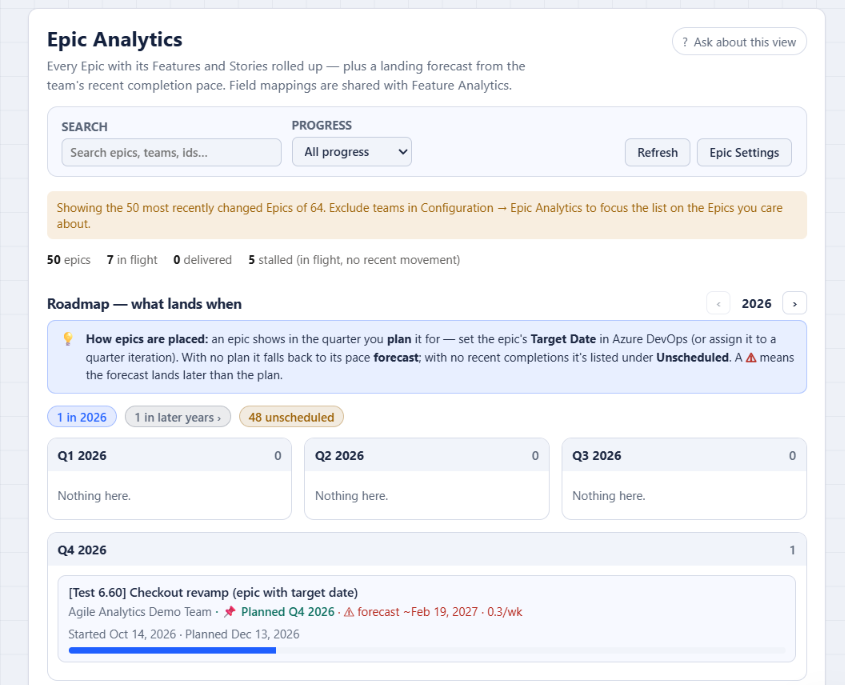
- Feature and Epic Analytics have Started and End columns. Started is when the first child became active, ignoring Removed children. End is the delivery date; if the item isn't delivered, it shows the Target Date, and for an epic without one, the product's forecast. Each End value says whether it's Delivered, Planned or Forecast.
- The Epic roadmap lays epics out by quarter. Epics with a Target Date or a quarter iteration show as Planned, and an epic whose pace forecast lands in a later quarter than its plan gets a warning. Epics with no plan and no recent pace are listed as unscheduled, with no date.
What it doesn't do: Investment Allocation groups completed work by work item type or tags, or by a field you choose. Its docs don't describe grouping by parent epic, so don't expect it to show which epic got the effort. The dates and progress depend on your links: an unparented story counts toward no feature. It runs on Azure DevOps Services only, not Azure DevOps Server.
FAQ
Can a user story have two parent features in Azure DevOps?
No. A work item can have only one parent, though a parent can have many children. If a story serves two features, give it one parent and add a Related link to the other feature.
Can a user story be a child of another user story?
Azure DevOps lets you create the link, but Microsoft advises against it. Same-type nesting disables reordering on the backlog, and boards and taskboards show only the lowest item in the chain. Split the story into siblings under a feature, or use a Related link.
Should features and epics have story points?
Put estimates on stories. Azure DevOps uses Story Points (Agile), Effort (Scrum) or Size (CMMI) on backlog items for velocity. Features and epics carry Effort, which in Agile and CMMI is a different field from the stories' estimate. It never sums itself, so treat it as a rough portfolio size and use a rollup Total column for the story points. Our guide to story points in Azure DevOps covers estimating stories.
Does the Basic process have Features?
No. Basic has Epic, Issue and Task. Custom portfolio levels can only be added above Epics, so you can't add a Feature level between Epic and Issue. Microsoft documents changing a Basic project to the Agile process if you need features.
Does deleting a backlog level delete the work items?
No. Deleting a custom portfolio level removes its backlog and board for all teams, including their customizations, but the work items stay unchanged. Inherited levels like Epics can't be deleted, only renamed or have their types disabled.
Want feature and epic progress with real start and end dates, without building it yourself? Start the 30-day Agile Analytics trial. No card needed, the whole organization gets access, and Epic Analytics reads the parent links you already have.