Story points in Azure DevOps are a team's relative size estimate for a backlog item. Only the Agile process has a field called Story Points. Scrum calls the same thing Effort, CMMI calls it Size, and Microsoft Learn says all three feed velocity and the Forecast tool. Tasks don't carry points; they carry hours in Remaining Work, which drives capacity and the Remaining Work burndown.
What are story points in Azure DevOps?
A story point is a number your team puts on a backlog item to say how big it is compared with other items. Microsoft defines Story Points as "a subjective measure of the size of a user story." Azure DevOps stores the number and adds it up for velocity, burndown and the Forecast tool.
The Agile workflow page says to estimate "by using any numeric unit of measurement your team prefers." A 5 only has meaning next to the 3s and 8s on the same team's backlog.
Which field holds story points in each process?
Agile uses Story Points on User Stories, Scrum uses Effort on Product Backlog Items, and CMMI uses Size on Requirements. Bugs carry both the estimate field and the task hour fields. Features and Epics carry Effort, so a default Feature has no Story Points field.
| Process | Backlog item | Estimate field | Task time fields |
|---|---|---|---|
| Agile | User Story, Bug | Story Points | Original Estimate, Remaining Work, Completed Work |
| Scrum | Product Backlog Item, Bug | Effort | Remaining Work only |
| CMMI | Requirement, Bug | Size | Original Estimate, Remaining Work, Completed Work |
| Basic | Issue | Not named by Microsoft Learn | Remaining Work |
| Agile, Scrum, CMMI (portfolio) | Feature, Epic | Effort | n/a |
Sources: numeric field reference and default processes. Story Points, Effort and Size all map to the same Effort role in the process configuration, so velocity and the forecast treat them the same way. Microsoft's field reference doesn't name an estimate field for the Basic Issue type (Basic has Epics but no Features), so open an Issue in your project and check the form before you plan to sum anything. If your team manages bugs with tasks, estimate them in Remaining Work like any task; bug points count toward velocity and forecasting only when bugs show on the backlog. Our comparison of Azure DevOps process templates explains the differences.
Story points vs hours: what goes on the story and what goes on the task?
Points go on the backlog item and describe its size. Hours go on its tasks as Original Estimate, Remaining Work and Completed Work, and describe time. Microsoft draws the line on its capacity page: "velocity correlates to how your team estimates requirements, capacity correlates to actual task time." Capacity, capacity bars and the Remaining Work burndown all read hours.
Task hours only pay off if your team breaks stories into tasks and updates Remaining Work daily or several times a week, as the burndown page asks. If your team won't, burn down on Story Points and skip task hours.
Naming adds to the confusion: Scrum's backlog field is called Effort, and the velocity page even says "effort hours" in one sentence. The field reference defines Effort as "a subjective measure of the size of a bug or product backlog item." Treat Effort as points with a different name. If your team does want to plan points against available days, Microsoft's capacity page is where per-person days live.
Can you put story points on tasks in Azure DevOps?
Not by default. The numeric field reference puts Story Points on User Stories and Bugs in the Agile process, and Task types carry Original Estimate, Remaining Work and Completed Work instead, or only Remaining Work in Scrum. The Forecast tool only reads the product backlog, and velocity is built around backlog items.
You could add a custom points field to tasks and point the Velocity widget at the Task type, since it lets you pick a backlog level or work item type. Then the same work counts twice: a query chart that sums points over a sprint's stories and tasks shows a 5-point story with three 2-point tasks as 11 points. Size the story in points and its tasks in hours.
Where do story points show up in Azure DevOps?
You see story points in four places: the work item form, board cards, backlog columns and the Analytics charts. If points don't show on cards, a team or project administrator can check "Show Effort" under Board settings > Fields, which "displays Story Points, Effort, or Size depending on your process." Each team sets this per backlog level.
You can edit most fields directly on the card, and the same card settings can highlight large items with a style rule; Microsoft's example is Story Points >= 20. On the backlog, add Story Points through Column options; those choices are personal to each user.
How do you sum story points in Azure DevOps?
Azure DevOps sums story points in four built-in places: a rollup column on the backlog, the Velocity chart, the sprint burndown and query charts. For the most common question, the total under a Feature or Epic, add a rollup column on the portfolio backlog.
| You want | Use | Notes |
|---|---|---|
| Points under each Feature or Epic | Rollup column on the portfolio backlog | Needs parent-child links in the same project |
| Points completed per sprint | Velocity, sum mode | Credit goes to the sprint where the item was completed |
| Points left in this sprint | Sprint burndown, Burndown on Story Points (Effort or Size in Scrum or CMMI) | Sums active or in-progress backlog items |
| A total for any list | Query chart set to sum | Flat-list queries only |
Some older answers claim backlogs can't roll up Story Points, Effort or Size, but the current rollup page says rollup "automatically sums child work item values to display totals on parent items" and can track "effort, size, or story points." Add it from Column options > Add a rollup column > From quick list. Which fields appear depends on the backlog level and your process. On portfolio backlogs, Microsoft suggests turning on Completed Child Items in View options when you compare states with rollup values.
The rollup is a separate column; the Feature's own Effort field keeps whatever someone typed into it. Velocity on the Features backlog sums those Effort values, so a rollup total doesn't feed it (velocity reports work on product and portfolio backlogs). Estimate Features in Effort too, or track them by count. If you're still setting up the hierarchy, our guide to epics, features and user stories covers the links rollup depends on.
Should you use Fibonacci for Azure DevOps story points?
You can, but Azure DevOps doesn't require it. Microsoft's backlog guidance says to "use relative sizing (powers of 2, Fibonacci sequence, or your team's preferred scale)." The field is a decimal number, so it accepts 0.5 or 4 just as readily as 3 or 5.
Teams like Fibonacci's gaps (1, 2, 3, 5, 8, 13) because nobody argues over 6 versus 7. Whatever scale you pick, Microsoft's velocity guidance asks teams to "minimize the size variability of backlog items," since fewer giant items make velocity steadier. The Forecast page recommends estimating as a team, with planning poker or a similar technique, and splitting large items.
How do story points feed velocity and the Forecast tool?
Velocity in sum mode adds the points of items completed in each sprint. The Forecast tool takes one velocity number you type in and draws sprint lines down your backlog using each item's points. An unestimated item uses no velocity, so the forecast fits it into the earliest sprint and the dates look better than they are.
Microsoft's Forecast page lists "missing work item estimates" as a cause of odd results, and adds a warning: "Question forecast results where the effort of an item is near to, or greater than, team velocity." If your team finishes about 20 points a sprint, a 21-point story is a candidate for splitting before it goes into a sprint. The tool also skips items already in progress (Active or Committed, for example), so it forecasts only work that hasn't started.
For the detailed rules on what counts as Planned, Completed or Completed Late, read how Azure DevOps calculates velocity. For what a single velocity number can and can't tell you, see Azure DevOps forecasting.
Story points per person: why Azure DevOps doesn't do it
Azure DevOps has no built-in per-person story point capacity or per-person velocity chart. Velocity is set up per team; the velocity page says "you can only configure your Velocity widget for a single team." Per-person planning happens in hours on the Capacity page.
Reporting points per person also changes how people estimate. Points that turn into a personal score tend to drift up, which is one reason Microsoft warns against confusing velocity with key performance indicators.
Common story point mistakes in Azure DevOps
Most story point problems in Azure DevOps start with the data on the board. The usual three are unestimated items, switching process without carrying the numbers over, and comparing points across teams. Each one skews velocity, burndown and rollup totals, and none of them shows an error message.
- Unestimated items. A blank estimate counts as nothing in a sum. Microsoft's numeric query page shows how to find user stories whose Story Points field is blank; check before sprint planning.
- Changing process. Moving from Agile to Scrum doesn't copy Story Points into Effort. Microsoft suggests using Excel to populate Effort from Story Points after the switch. Add the Story Points field to the inherited Scrum types first, so the values are still there to copy.
- Comparing teams. A 5 on one team is not a 5 on another. Only add points across teams that estimate on a shared scale, and never rank teams by them.
What Agile Analytics adds, and what it doesn't
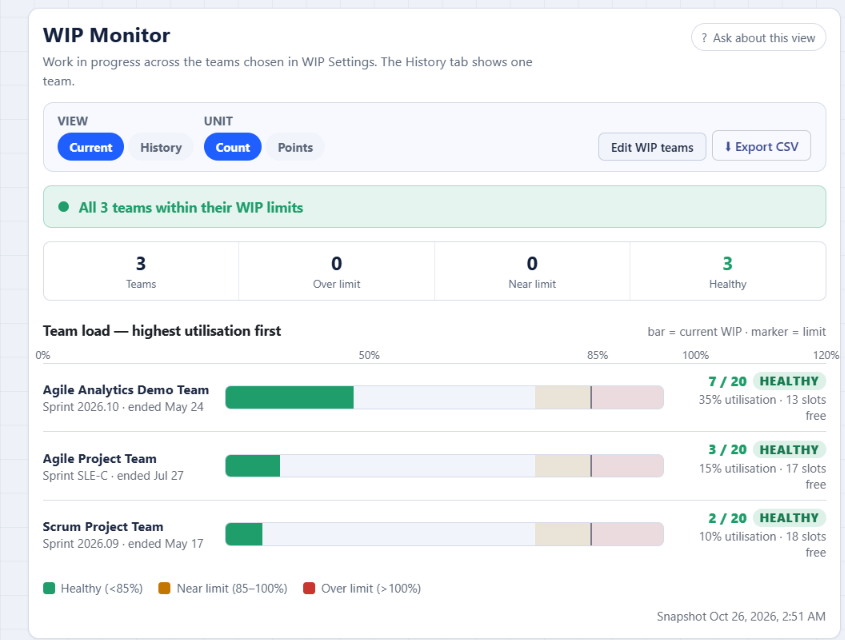
Agile Analytics is an Azure DevOps Services extension from Baytek that reads the estimates you already have. Its Flow Metrics and WIP Monitor views switch between item count and points, and they tell you how many items are missing an estimate.
What it adds, per the 6.31 release notes and the features page:
- A Count / Points toggle on Flow Metrics and the WIP Monitor. Points come from Story Points, a numeric Size or Effort field, or a T-shirt size from XS to XXL. The default stays Count.
- Items without an estimate are left out of the points total, and the view says so each time: "N of M items have no estimate."
What it doesn't do:
- WIP limits, delivery forecasts and CSV exports stay item-based by design. The Monte Carlo forecast and the free Monte Carlo Sprint Forecast widget count items, not points, so enter remaining work as a number of items.
- It runs on Azure DevOps Services only, not Azure DevOps Server.
See your points and gaps side by side: start the 30-day Agile Analytics trial. No card is needed, your whole organization gets access, and nothing is deleted when it ends.
FAQ
Is Effort the same as Story Points in Azure DevOps?
For planning purposes, yes. Effort is the Scrum name and Size the CMMI name for the same backlog estimate, and all three map to the same role that velocity and the Forecast tool read.
Why doesn't my Feature show a story point total?
Features have an Effort field rather than Story Points, and rollup doesn't write into that field. Add a rollup column on the Features backlog through Column options to see the sum of child story points. The children must be linked as child items in the same project.
Can I see story points per person in Azure DevOps?
There is no per-person velocity chart or story point capacity; velocity is configured per team. Per-person load is planned in hours on the Capacity page.